10 Best SSDs for Laptops in India (November 2026): NVMe and SATA Upgrades


An SSD upgrade is the cheapest way to make a slow laptop feel new. Picking the best SSD for laptop use is not only about speed, though: the drive must match your slot size, your interface and your PCIe generation, or it simply will not work. This guide explains those checks in plain words and lists ten drives we would actually fit.
It sits in our PC components guide, which covers RAM and hard disks too. Every drive below was confirmed in stock at the price shown on 4 November 2026 and checked against the maker's spec sheet, so you can choose the best SSD for laptop upgrades with confidence.
On this page
- Best SSD for laptop picks at a glance
- Will it fit? M.2 2280 and PCIe generation explained
- How fast is each drive?
- The 10 best SSDs for laptops we checked
- How to choose the best SSD for laptop upgrades
- How to install a laptop SSD safely
- Best SSD for laptop use, by type of user
- NVMe vs SATA: which is the best SSD for laptop users?
- FAQs
- Final word
- More buying guides
Best SSD for laptop picks at a glance

SSD prices in India have climbed sharply through 2026 because of the global NAND flash shortage, so a 1TB drive now costs roughly what a 2TB drive did two years ago. Here is the short list, with the price we saw on 4 November 2026.
| Best SSD for laptop | Type | Read speed | Price seen | Best for |
|---|---|---|---|---|
| WD Blue SN5000 500GB | NVMe PCIe 4.0 | 5,000 MB/s | ₹12,499 | Tight budget |
| Crucial BX500 1TB | 2.5-inch SATA | 540 MB/s | ₹18,500 | Older laptops with a SATA bay |
| WD Blue SN5100 1TB | NVMe PCIe 4.0 | 7,100 MB/s | ₹18,900 | Best value Gen4 |
| Crucial P310 1TB (2280) | NVMe PCIe 4.0 | 7,100 MB/s | ₹18,980 | Low power, cool running |
| Crucial P3 Plus 1TB | NVMe PCIe 4.0 | 5,000 MB/s | ₹18,999 | Students, office laptops |
| WD Black SN7100 1TB | NVMe PCIe 4.0 | 7,250 MB/s | ₹21,000 | Gaming laptops |
| Samsung 870 EVO 500GB | 2.5-inch SATA | 560 MB/s | ₹21,229 | Reliable SATA upgrade |
| Samsung 990 EVO Plus 1TB | NVMe PCIe 4.0 / 5.0 x2 | 7,150 MB/s | ₹27,699 | Best overall |
| Samsung 990 PRO 1TB | NVMe PCIe 4.0 | 7,450 MB/s | ₹29,250 | Creators, heavy files |
| Crucial T500 1TB | NVMe PCIe 4.0 | 7,300 MB/s | ₹34,999 | Sustained heavy writes |
If you only want one answer, the best SSD for laptop upgrades for most people is the WD Blue SN5100 or Crucial P310: Gen4 speed, low power draw and a five-year warranty at under ₹19,000 for 1TB.
Will it fit? M.2 2280 and PCIe generation explained

Before you choose the best SSD for laptop use, open your laptop's spec sheet or service manual and check four things. Getting any one wrong is the most common reason an upgrade fails.
1. Form factor: M.2 2280 is the standard
Most laptops sold in India since 2018 use an M.2 slot. The number after "M.2" is the size: 2280 means 22 mm wide and 80 mm long. Almost every drive on this list is 2280. Some thin laptops and handhelds use the shorter 2242 or 2230 size, and a 2280 drive will not fit those. Measure the old drive or read the manual before you order.
2. Interface: NVMe or SATA
M.2 is only the shape. The drive can talk over NVMe (PCIe), which is fast, or over SATA, which is about ten times slower. Nearly every laptop with an M.2 slot made after 2019 supports NVMe. Older laptops may have an M.2 SATA slot or only a 2.5-inch drive bay, and for those a 2.5-inch SATA drive such as the Crucial BX500 is the best SSD for laptop revival.
3. PCIe generation: backward compatible
PCIe 4.0 drives work in PCIe 3.0 slots, just at Gen3 speed of about 3,500 MB/s. You lose some peak speed, but in daily use the difference is hard to notice. So a Gen4 drive is a safe buy even for an older laptop, and it keeps its full speed if you move it to a newer machine. PCIe 5.0 drives run hot and draw more power, so we do not recommend them for laptops yet. The Samsung 990 EVO Plus is a neat exception: it can run on two Gen5 lanes or four Gen4 lanes.
4. Thickness and heatsinks
Laptops have very little space above the M.2 slot. Single-sided drives without a heatsink fit best. We rechecked the Crucial P310 listing B0DV3C5HQH: it is the heatsink version, made for desktops and the PS5, and will not fit most laptops. That is why our pick is the plain Crucial P310 2280 without a heatsink. Crucial explains the slot types in its M.2 PCIe vs SATA guide.
How fast is each drive?

Sequential read speed is the headline number on the box. It matters when you copy big files or load large game levels. For booting Windows and opening apps, random speed and low latency matter more, and every NVMe drive here is far quicker than a hard disk or SATA SSD.
In real use, any Gen4 drive above 5,000 MB/s feels the same for office work, study and browsing. Spend extra on a 7,000 MB/s drive only if you edit video, move large projects or play big games. This is why the best SSD for laptop buyers on a budget is often a cheaper Gen4 drive rather than the fastest model.
The 10 best SSDs for laptops we checked
Here are the ten drives, ordered from lowest to highest price. Each was in stock and checked against its maker's spec sheet on 4 November 2026. All NVMe picks are M.2 2280 and single-sided unless noted.
WD Blue SN5000 500GB NVMe M.2 SSD
The cheapest Gen4 drive we would fit. 500GB is enough for Windows, Office and study files, and it costs far less than any 1TB drive this year.
- Interface
- PCIe Gen4 x4 NVMe
- Form factor
- M.2 2280
- Read speed
- Up to 5,000 MB/s
- Capacity
- 500GB
- Warranty
- 5 years
- Price seen
- ₹12,499
Crucial BX500 1TB 2.5-inch SATA SSD
If your laptop still has a hard disk in a 2.5-inch bay, this is the best SSD for laptop revival. Boot time drops from minutes to seconds.
- Interface
- SATA 6Gb/s
- Form factor
- 2.5-inch, 7 mm
- Read speed
- Up to 540 MB/s
- Capacity
- 1TB
- Warranty
- 3 years
- Price seen
- ₹18,500
WD Blue SN5100 1TB NVMe M.2 SSD
Near top-end speed at a mid-range price, with a long warranty. Our pick as the best SSD for laptop upgrades for most buyers.
- Interface
- PCIe Gen4 x4 NVMe
- Form factor
- M.2 2280
- Read speed
- Up to 7,100 MB/s
- Capacity
- 1TB
- Warranty
- 5 years
- Price seen
- ₹18,900
Crucial P310 1TB 2280 NVMe M.2 SSD
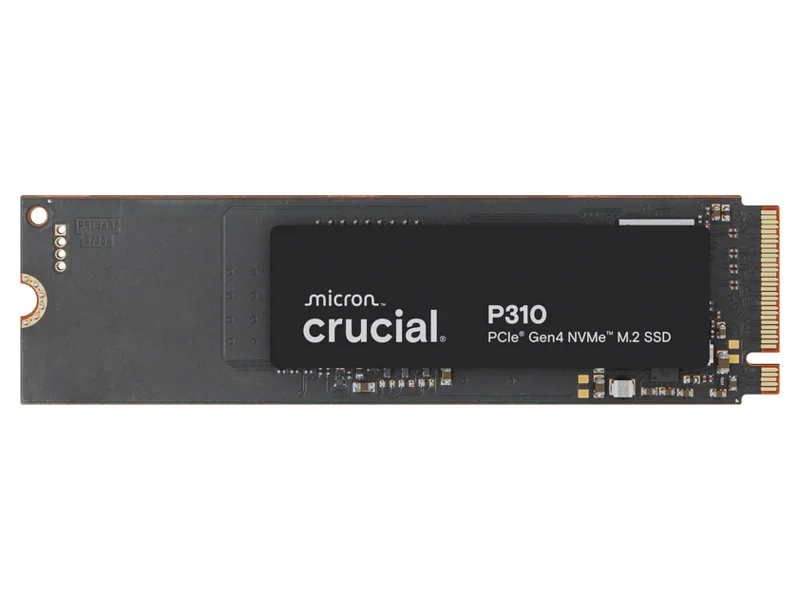
A DRAM-less design that runs cool and sips power, which suits thin laptops. Buy this 2280 version, not the heatsink model.
- Interface
- PCIe Gen4 x4 NVMe
- Form factor
- M.2 2280, no heatsink
- Read speed
- Up to 7,100 MB/s
- Write speed
- Up to 6,000 MB/s
- Warranty
- 5 years
- Price seen
- ₹18,980
Crucial P3 Plus 1TB NVMe M.2 SSD
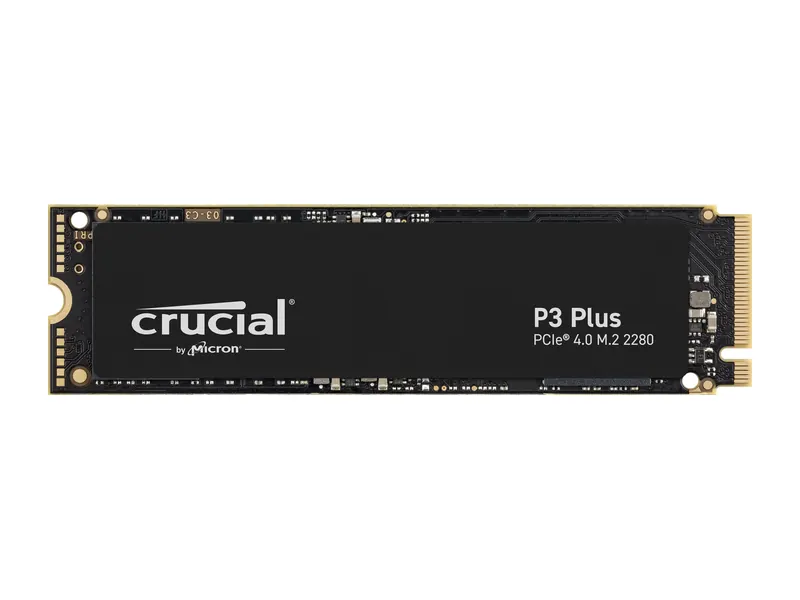
A proven, widely used drive that works in both Gen3 and Gen4 laptops. Fast enough for everyday work and studies.
- Interface
- PCIe Gen4 x4 NVMe
- Form factor
- M.2 2280
- Read speed
- Up to 5,000 MB/s
- Capacity
- 1TB
- Warranty
- 5 years
- Price seen
- ₹18,999
WD Black SN7100 1TB NVMe M.2 SSD
Fast load times and strong write speed with good power efficiency. The best SSD for laptop gamers adding a second drive.
- Interface
- PCIe Gen4 x4 NVMe
- Form factor
- M.2 2280
- Read / write
- Up to 7,250 / 6,900 MB/s
- Capacity
- 1TB
- Warranty
- 5 years
- Price seen
- ₹21,000
Samsung 870 EVO 500GB 2.5-inch SATA SSD
Pricier than the BX500, but it has DRAM cache and Samsung's five-year warranty. Choose it for a work laptop you want to keep for years.
- Interface
- SATA 6Gb/s
- Form factor
- 2.5-inch, 7 mm
- Read speed
- Up to 560 MB/s
- Capacity
- 500GB
- Warranty
- 5 years
- Price seen
- ₹21,229
Samsung 990 EVO Plus 1TB NVMe M.2 SSD
Excellent speed, low heat and Samsung Magician software for updates and health checks. The best SSD for laptop buyers who want one drive that does everything.
- Interface
- PCIe Gen4 x4 / Gen5 x2 NVMe 2.0
- Form factor
- M.2 2280
- Read / write
- Up to 7,150 / 6,300 MB/s
- Capacity
- 1TB
- Warranty
- 5 years
- Price seen
- ₹27,699
Samsung 990 PRO 1TB NVMe M.2 SSD
DRAM cache and top random speed help with large photo and video projects. Worth it for creative work laptops.
- Interface
- PCIe Gen4 x4 NVMe
- Form factor
- M.2 2280
- Read / write
- Up to 7,450 / 6,900 MB/s
- Capacity
- 1TB
- Warranty
- 5 years
- Price seen
- ₹29,250
Crucial T500 1TB NVMe M.2 SSD
Holds high speed through long transfers thanks to DRAM cache. Expensive right now, so buy it only if you move huge files daily.
- Interface
- PCIe Gen4 x4 NVMe
- Form factor
- M.2 2280
- Read speed
- Up to 7,300 MB/s
- Capacity
- 1TB
- Warranty
- 5 years
- Price seen
- ₹34,999
How to choose the best SSD for laptop upgrades

Use this short checklist to pick the best SSD for laptop use without wasting money.
- Check the slot first. Read your laptop's manual or the maker's support page for slot size (2280, 2242 or 2230), interface (NVMe or SATA) and PCIe generation.
- Look for a free second slot. Many gaming laptops have two M.2 slots, so you can add a drive instead of replacing one. Our laptops by storage guide notes which models have one.
- Pick the right capacity. 500GB suits office and study use, 1TB suits most people, and gamers or video editors should aim for 2TB. Our is 512GB SSD enough explainer goes deeper.
- Prefer a five-year warranty. All our NVMe picks have one. Register the drive with the maker after you install it.
- Plan the move. Clone your old drive with the maker's free tool, or do a clean Windows install from a USB stick. Back up your files first either way.
DRAM-less drives like the Crucial P310 and WD Blue SN5100 use a little of your laptop's memory as cache (HMB). They are fine for everyday use and draw less power. DRAM drives like the Samsung 990 PRO and Crucial T500 hold speed better under very heavy loads.
How to install a laptop SSD safely
Fitting the best SSD for laptop upgrades takes about twenty minutes with a small Phillips screwdriver. Shut down the laptop fully, unplug it and, if possible, disconnect the battery inside before touching the board.
Remove the bottom panel screws and gently pry the panel with a plastic tool. Find the M.2 slot, remove the single screw at the end, slide the drive in at a slight angle, press it flat and replace the screw. Keep any thermal pad or shield that sat on the old drive.
Check your warranty terms before opening the laptop. Most makers in India allow storage upgrades, but some void warranty for damage caused while the panel is off. If in doubt, ask the service centre to fit the drive for you.
Best SSD for laptop use, by type of user
Students. The best SSD for laptop study use is a 500GB or 1TB Gen4 drive such as the WD Blue SN5000 or Crucial P3 Plus. They are fast enough for coding, notes and video calls, and they keep the cost down. Pair the upgrade with our best laptops for students advice if you are also choosing a new machine.
Office workers. Reliability and battery life matter more than peak speed. The best SSD for laptop office use is the low-power Crucial P310 or the Samsung 870 EVO for an older laptop with a SATA bay.
Gamers. Games now take 70GB to 150GB each, so get at least 1TB. The best SSD for laptop gaming is the WD Black SN7100, and a second M.2 slot lets you add it without reinstalling Windows.
Creators. Video and photo editors move big files all day. The best SSD for laptop creative work is the Samsung 990 PRO or Crucial T500, whose DRAM cache keeps write speed high during long exports.
NVMe vs SATA: which is the best SSD for laptop users?
If your laptop supports NVMe, choose NVMe. It is several times faster and the price gap with SATA has almost vanished. SATA only makes sense for older laptops with a 2.5-inch bay or an M.2 SATA slot.
| Feature | NVMe (PCIe 4.0) | SATA SSD | Hard disk |
|---|---|---|---|
| Read speed | 5,000–7,450 MB/s | 540–560 MB/s | Up to 140 MB/s (laptop) |
| Boot time | About 10 seconds | About 15 seconds | Over a minute |
| Fits | M.2 NVMe slot | 2.5-inch bay or M.2 SATA | 2.5-inch bay |
| Best for | Any laptop from 2019 onwards | Older laptops | Not recommended in 2026 |
Frequently asked questions
What is the best SSD for laptop upgrades in India?
For most people, the best SSD for laptop upgrades is a 1TB PCIe 4.0 NVMe drive such as the WD Blue SN5100 or Crucial P310 at about ₹19,000. The Samsung 990 EVO Plus is the best overall if you can spend more.
Will a PCIe 4.0 SSD work in a PCIe 3.0 laptop?
Yes. PCIe is backward compatible, so a Gen4 drive works in a Gen3 slot at Gen3 speed, about 3,500 MB/s. It still feels much faster than a SATA SSD or hard disk.
How do I know which SSD fits my laptop?
Check your laptop's manual or the maker's support page for the M.2 size (usually 2280), the interface (NVMe or SATA) and the PCIe generation. You can also remove the bottom panel and read the label on the existing drive.
Is 500GB SSD enough for a laptop?
For office work, study and browsing, 500GB is enough. Gamers and creators should get 1TB or more, because modern games often take 100GB each.
Can I use an SSD with a heatsink in a laptop?
Usually not. Heatsink drives are too thick for most laptops. Buy the plain M.2 2280 version and keep the laptop's own thermal pad or shield.
Why are SSD prices so high in 2026?
A global shortage of NAND flash, driven by demand from AI data centres, has pushed SSD prices up sharply through 2026. Check the live price before buying, as it changes often.
The final word
The best SSD for laptop upgrades is the one that fits your slot. For most buyers that means a 1TB M.2 2280 PCIe 4.0 drive such as the WD Blue SN5100 or Crucial P310. Gamers should look at the WD Black SN7100, and anyone who wants the best overall should get the Samsung 990 EVO Plus. Older laptops with a 2.5-inch bay are best served by the Crucial BX500.
Before you buy, confirm the slot details, back up your files and check the live price. For memory and hard disk upgrades, head back to our PC components guide, and to see which laptops already ship with enough storage, read our laptops by storage guide.
Last updated on . Specifications, stock and prices change frequently. Always check the live listing before you buy.
More buying guides

Best laptops under ₹70,000
Best laptop under 70000 in India: 8 Core Ultra, Snapdragon X, Ryzen 7 and Core i5 picks compared on verified specs, with honest pros, cons and buying tips.
Read guide →
Best laptops under ₹1 lakh
Best laptop under 1 lakh in India: 8 Core Ultra, Ryzen AI, OLED and MacBook Neo picks compared on verified specs, with honest pros, cons and buying tips.
Read guide →
Best gaming laptops under ₹1.25 lakh
Best gaming laptop under 1.25 lakh in India: 6 in-stock RTX 4050 and RTX 3050 laptops from HP, Lenovo and Acer, checked on CPU, memory, screen and battery.
Read guide →