What Is a MUX Switch in a Gaming Laptop, and Do You Need One?


A MUX switch in a laptop is a small hardware chip that decides which graphics processor drives the screen. Without one, every frame your RTX graphics card draws is copied through the processor's built-in graphics before it reaches the display. With a MUX switch laptop owners can send frames straight from the graphics card to the panel, which removes that detour and usually adds a few frames per second in games.
It is one of those spec-sheet lines that sounds technical but is easy to judge once you know what it does. This explainer is part of our laptop graphics card guide. Below we cover what a MUX switch is, how much it really helps, when to switch it on or off, how to check whether your laptop has one, which brands include it, and two in-stock laptops that list one.
On this page
- What is a MUX switch laptop?
- MUX switch laptop vs NVIDIA Advanced Optimus: what is the difference?
- Does a MUX switch laptop get more FPS?
- MUX switch on or off: which mode should a MUX switch laptop use?
- Do you need a MUX switch laptop? What it is used for
- Is my laptop a MUX switch laptop? How to check
- MUX switch laptop brands: Lenovo LOQ, HP Victus, ASUS TUF, MSI and Acer
- MUX switch laptop list: models in stock now
- How we checked this guide
- FAQs
- Final word
- More buying guides
What is a MUX switch laptop?

MUX is short for multiplexer: a switch that takes several inputs and passes one of them through. In a gaming laptop, the two inputs are the integrated graphics inside the processor (Intel or AMD) and the dedicated graphics card (an NVIDIA RTX chip). The output is the laptop's own display. A MUX switch laptop can connect the display to either one, and NVIDIA documents the hybrid design it improves on as Optimus.
Every laptop with an RTX card but no MUX switch uses NVIDIA Optimus, called Hybrid mode. The RTX card renders the game, then hands each finished frame to the integrated graphics, which sends it to the screen. That saves battery, because the big GPU can sleep when you are only browsing, but it costs some performance and adds a little latency while gaming.
When a MUX switch laptop is set to discrete GPU mode (Lenovo calls it dGPU mode, ASUS calls it Ultimate, HP calls it Discrete), the RTX card is wired straight to the panel and the integrated graphics step aside. You will hear the same word in networking and electronics, where a MUX switch simply selects between data lines. The idea is identical; this guide is about the gaming laptop version.
MUX switch laptop vs NVIDIA Advanced Optimus: what is the difference?
A basic MUX switch needs a restart every time you change mode. NVIDIA Advanced Optimus is a smarter MUX switch: it changes the display path automatically, without a restart, when a supported game starts and stops. You get Hybrid-mode battery life on the desktop and a direct GPU connection in games.
Both of the in-stock laptops we list below, the Lenovo LOQ Essential and the Lenovo LOQ 15 (i5-13450HX), list a MUX switch with Advanced Optimus. Advanced Optimus needs a compatible panel and driver, so the cheapest MUX switch laptops often have a basic MUX switch only, while newer mid-range and premium gaming laptops add Advanced Optimus.
Windows 11 has also narrowed the gap. Recent versions can pass frames from the RTX card to the screen more efficiently in Hybrid mode for many games, so the advantage of a MUX switch laptop is smaller in 2026 than it was a few years ago. It still exists, especially in fast eSports titles.
Does a MUX switch laptop get more FPS?
Yes, but by how much depends on the game. The gain is largest where frame rates are already high and the processor is busy, such as Valorant, CS2 and Fortnite at 1080p, because copying hundreds of frames per second through the integrated graphics adds overhead. Independent laptop reviews commonly measure roughly 5 to 15 per cent more FPS in those games when a MUX switch laptop runs in discrete GPU mode.
In heavy, graphics-limited games running at 40 to 70 FPS, such as big open-world titles at high settings, the gain is often small, sometimes within the margin of error. On any MUX switch laptop, discrete mode also trims input latency slightly, which competitive players notice more than casual ones.
Keep it in proportion. A MUX switch matters less than the GPU's power limit (TGP), the cooling and the RAM. A 95W RTX 3050 with a MUX switch can still lose to a 115W RTX 4060 without one. Our laptop graphics card list explains those bigger factors first.
MUX switch on or off: which mode should a MUX switch laptop use?
Use this simple rule:
- Gaming while plugged in: switch the MUX to discrete GPU mode (dGPU, Ultimate or Discrete), or leave Advanced Optimus on Auto if your laptop has it. This gives the highest FPS and lowest latency.
- Working on battery: switch back to Hybrid (Optimus) mode. In dGPU mode the RTX card stays awake all the time, and battery life can drop by half or more.
- Video editing and 3D work: Hybrid mode is usually fine, because the apps use the RTX card for rendering either way. Use dGPU mode if you also drive a high-refresh external monitor or see stutter in the viewport.
- External monitor: many gaming laptops wire the HDMI port straight to the RTX card, so a game on an external screen already bypasses the integrated graphics even without a MUX switch.
Switching modes on a MUX switch laptop is safe. A basic MUX switch asks for a restart, so save your work first. It will not harm the laptop or void the warranty, because it is a setting the manufacturer provides.
Do you need a MUX switch laptop? What it is used for
A MUX switch is used for one thing: getting the most out of the graphics card on the built-in screen. Whether you need it depends on how you use the laptop.
- You should look for a MUX switch laptop if you play competitive shooters or other high-FPS games on the laptop screen and want every frame.
- It is a nice extra if you play story games, edit video or study engineering. Prefer it when two laptops are otherwise equal, but do not pay a big premium.
- You do not need one if you mostly play on an external monitor, game rarely, or are buying a laptop without a dedicated graphics card. See integrated vs dedicated graphics if you are unsure whether you need an RTX card at all.
Is my laptop a MUX switch laptop? How to check
You can check in under five minutes:
- Look at the spec sheet. Search the manufacturer's page or the product listing for "MUX switch", "Advanced Optimus", "dGPU mode" or "Discrete graphics mode".
- Open the brand's control app. Lenovo Vantage (or Legion Space) shows a GPU Working Mode setting, ASUS Armoury Crate shows GPU Mode with an Ultimate option, HP OMEN Gaming Hub shows a Graphics Switcher, MSI Center shows a GPU switch, and Acer PredatorSense or NitroSense shows a GPU mode where supported. If the option is missing, it is most likely not a MUX switch laptop.
- Check Device Manager. Open Device Manager, then Display adapters. If you switch to dGPU mode and the integrated graphics disappear from the list after a restart, the MUX switch is working.
- Look in the NVIDIA Control Panel. On laptops with Advanced Optimus, the Manage Display Mode page shows the choices, including Optimus, NVIDIA GPU only and Automatic select.
MUX switch laptop brands: Lenovo LOQ, HP Victus, ASUS TUF, MSI and Acer
Brands do not add a MUX switch to every model, and sometimes not to every configuration of the same model. Treat this as a guide to which brands sell a MUX switch laptop, and confirm the exact model number before you buy.
| Brand and series | MUX switch? | Where you switch it |
|---|---|---|
| Lenovo LOQ and Legion | Common. Many LOQ models list a MUX switch with Advanced Optimus | Lenovo Vantage or Legion Space, GPU Working Mode |
| HP Victus | Some Victus 16 models have one; most Victus 15 models do not | OMEN Gaming Hub, Graphics Switcher |
| HP OMEN | Common on recent models | OMEN Gaming Hub |
| ASUS TUF (A15, F15, A16) | Many recent models; check the exact configuration | Armoury Crate, GPU Mode, Ultimate |
| ASUS ROG | Common, often with Advanced Optimus | Armoury Crate |
| MSI | Mid-range and premium series usually; budget Thin models often do not | MSI Center, GPU switch |
| Acer Predator and Nitro | Predator models usually; budget Nitro models vary | PredatorSense or NitroSense |
Lenovo LOQ: the LOQ is the most common MUX switch laptop in India, and the feature is one of its best selling points. In Lenovo Vantage you choose Hybrid, dGPU or Auto mode, and Auto uses Advanced Optimus to switch without a restart on supported models. See how it compares in Lenovo LOQ vs HP Victus.
HP Victus: the Victus 15 models we have checked do not list a MUX switch, so they run in Hybrid mode only. Several Victus 16 models add a Graphics Switcher in OMEN Gaming Hub with Hybrid and Discrete modes. If the switcher is not in your OMEN Gaming Hub, your model does not have it.
ASUS TUF A15 and F15: on models with a MUX switch, Armoury Crate offers Eco, Standard, Optimized and Ultimate GPU modes; Ultimate is the MUX setting and needs a restart. Some budget TUF configurations skip it, so check the spec sheet for "MUX Switch".
MSI and Acer: both put the setting in their control apps (MSI Center, PredatorSense or NitroSense). Their cheapest gaming lines are the ones most likely to leave it out.
MUX switch laptop list: models in stock now
These two laptops list a MUX switch with Advanced Optimus and were in stock with a live price when we checked on 18 November 2026. Both are Lenovo LOQ models, because they were the in-stock models where we could confirm the feature on the manufacturer's spec page. For more options by budget, see our gaming laptops under ₹1 lakh and gaming laptops under ₹1.25 lakh.
Lenovo LOQ Essential (Ryzen 5 7535HS, RTX 3050 6GB)
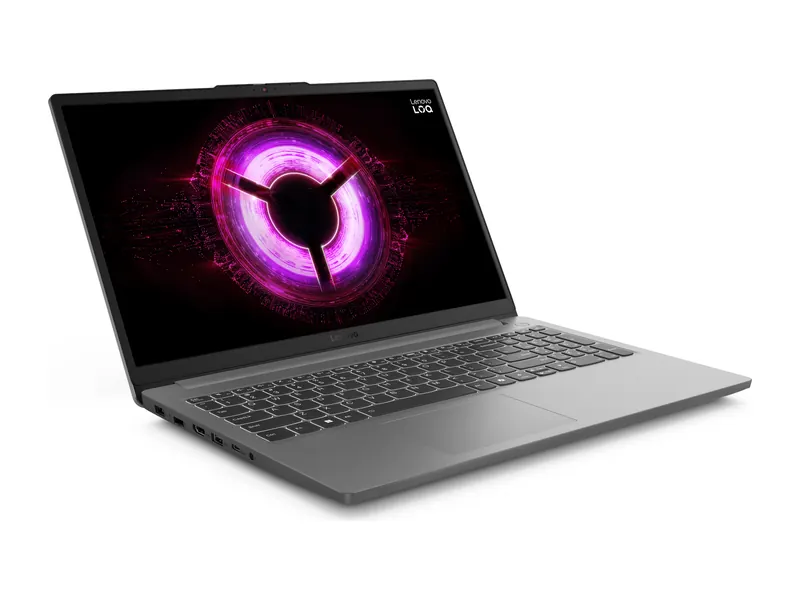
The cheapest MUX switch laptop we found in stock. Its RTX 3050 6GB runs at 65W, which is modest, but the MUX switch with Advanced Optimus lets that GPU drive the 144Hz, 100% sRGB screen directly in games. A free second M.2 slot and a light 1.8 kg body make it an easy laptop to live with. It is a good fit for eSports and older AAA games at 1080p medium settings.
- MUX switch
- MUX switch with Advanced Optimus, G-Sync, Wi-Fi 6
- Graphics
- NVIDIA GeForce RTX 3050 6GB GDDR6, 65W TGP
- Processor
- AMD Ryzen 5 7535HS (6 cores, 12 threads, up to 4.55 GHz)
- Memory
- 16GB DDR5-4800 (1x16GB)
- Display
- 15.6" FHD IPS, 144Hz, 300 nits, 100% sRGB
- Weight
- 1.8 kg
- Price (18 Nov)
- ₹98,333
Lenovo LOQ 15 (Core i5-13450HX, RTX 3050 6GB, 16GB/512GB)
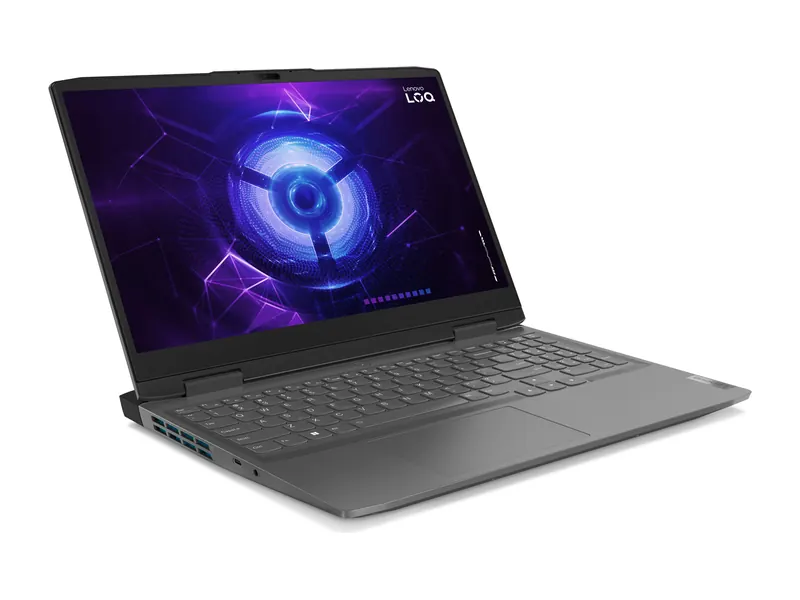
This LOQ 15 runs its RTX 3050 6GB at 95W, a clear step up from the Essential, and pairs it with a 10-core Core i5-13450HX that keeps frame rates steady in busy games. The MUX switch with Advanced Optimus, G-Sync and a 100% sRGB panel make it the better MUX switch laptop for high-FPS shooters. It is heavier at 2.38 kg, so it suits a desk more than a backpack.
- MUX switch
- MUX switch with Advanced Optimus, Wi-Fi 6, LA1 AI chip
- Graphics
- NVIDIA GeForce RTX 3050 6GB GDDR6, 95W TGP
- Processor
- Intel Core i5-13450HX (10 cores/16 threads, up to 4.6GHz)
- Memory
- 16GB DDR5-4800 (1x 16GB, up to 32GB)
- Display
- 15.6-inch FHD (1920×1080) IPS, 144Hz, 300 nits, 100% sRGB, G-Sync
- Weight
- 2.38 kg
- Price (18 Nov)
- ₹1,13,000
Prefer an RTX 4050 or RTX 4060? Several of those are also MUX switch laptops, but stock changes quickly. Our gaming laptops under ₹1.5 lakh guide flags the feature on each pick.
How we checked this guide
For every MUX switch laptop mentioned here, we read the MUX switch and Advanced Optimus details on each manufacturer's specification pages and in their control apps' documentation, and cross-checked owner reports for models where the spec sheet was unclear. We then opened each listed laptop's product page on 18 November 2026 and kept only models that were in stock with a live price. We do not run our own FPS benchmarks, so the performance ranges above reflect the range commonly reported in independent reviews, not our own lab numbers.
Frequently asked questions
What is a MUX switch laptop?
A MUX switch laptop has a hardware chip that lets the dedicated graphics card send frames straight to the laptop screen instead of through the processor's integrated graphics. It improves gaming performance and lowers latency.
Does a MUX switch laptop get more FPS?
Yes. Independent reviews commonly measure about 5 to 15 per cent more FPS in high-frame-rate games like Valorant and CS2. In heavy, graphics-limited games the gain is often small.
Should I keep the MUX switch on or off?
Turn it on (dGPU, Ultimate or Discrete mode) for gaming while plugged in. Switch back to Hybrid mode on battery, because dGPU mode keeps the graphics card awake and drains the battery much faster.
What is the difference between a MUX switch and Advanced Optimus?
A basic MUX switch needs a restart to change mode. NVIDIA Advanced Optimus switches automatically, without a restart, when a supported game starts and stops.
Does the Lenovo LOQ have a MUX switch?
Many Lenovo LOQ models do, including the LOQ Essential and LOQ 15 we list here, both with Advanced Optimus. You switch it in Lenovo Vantage under GPU Working Mode.
Does the HP Victus have a MUX switch?
Most HP Victus 15 models do not. Several Victus 16 models do, with a Graphics Switcher in OMEN Gaming Hub. If the switcher is missing in the app, your model does not have one.
Does the ASUS TUF A15 have a MUX switch?
Many recent ASUS TUF A15 and F15 models do, set through Armoury Crate as the Ultimate GPU mode. Some budget configurations skip it, so check the spec sheet for the exact model.
Is it safe to use the MUX switch on a MUX switch laptop?
Yes. It is a manufacturer setting, it does not void the warranty and it cannot damage the laptop. A basic MUX switch needs a restart, so save your work first.
The final word
A MUX switch laptop gives you a few extra frames and slightly lower latency on the built-in screen, mostly in fast eSports games. It is worth having, and worth picking when two laptops are otherwise equal, but the GPU tier and its TGP matter more. If you want one at the lowest price, start with the Lenovo LOQ Essential; for more power, the Lenovo LOQ 15 (i5-13450HX). Then compare the rest of the options in our laptop graphics card guide.
Last updated on . Specifications, stock and prices change frequently. Always check the live listing before you buy.
More buying guides

Best gaming laptops under ₹1 lakh
Best gaming laptop under 1 lakh in India: 7 RTX picks from Lenovo LOQ, Acer, ASUS TUF, MSI and Dell, with verified GPU wattage, specs and honest advice.
Read guide →
Best gaming laptops under ₹1.25 lakh
Best gaming laptop under 1.25 lakh in India: 6 in-stock RTX 4050 and RTX 3050 laptops from HP, Lenovo and Acer, checked on CPU, memory, screen and battery.
Read guide →
Best gaming laptops under ₹80,000
Best gaming laptop under 80000 in India: an in-stock Acer ALG with RTX 3050 6GB at ₹79,990, plus 5 Radeon picks for eSports, with honest caveats.
Read guide →
Best gaming laptops under ₹1.5 lakh
Best gaming laptop under 1.5 lakh in India: 7 RTX 5050, RTX 4060 and RTX 4050 picks compared on verified specs, GPU wattage, battery and honest trade-offs.
Read guide →