10 Best RAM for Laptop in India (November 2026): DDR4 and DDR5 SO-DIMM


The best RAM for laptop upgrades in 2026 is the module that matches your machine, not the fastest stick on the shelf. DDR4 and DDR5 SO-DIMMs are keyed differently and are not interchangeable. 8GB is tight for Windows 11, 16GB is the sensible everyday target, and 32GB is for heavy multitasking and creative work. Memory prices in India have risen sharply this year, so a well-chosen 16GB stick is often a better buy than a new laptop, but only if your machine actually has a free slot.
This page sits under our PC components hub and is about the memory modules themselves. If you are choosing a new laptop by how much RAM it ships with, use our laptops by RAM guide instead. Crucial's System Scanner is the easiest way to confirm the exact modules your model accepts before you order. We could not re-check every listing price on 10 November 2026, so confirm stock and the live price on the product page.
On this page
- Best laptop RAM picks at a glance
- DDR4 vs DDR5 laptop RAM: which does your machine take?
- How much laptop RAM do you need: 8GB, 16GB or 32GB?
- The 10 best laptop RAM modules in India
- How to choose RAM for a laptop
- How to install RAM in a laptop
- Best RAM for laptop for students
- Best RAM for laptop gaming
- Which RAM brand is best for a laptop in India?
- Is a laptop RAM upgrade worth it in 2026?
- Where this page sits in the component guides
- FAQs
- Final word
- More buying guides
Best laptop RAM picks at a glance
For most older machines, the Crucial 16GB DDR4-3200 is the default upgrade. For most current machines, the Crucial 16GB DDR5-5600 is the best RAM for laptop use overall, because the compatibility tool is as useful as the module itself. Use the 8GB sticks only to fill a second slot (our 8GB DDR4 RAM for laptop list compares seven of them by speed and price), and use the Kingston 4800 MT/s stick if your laptop is a first-generation DDR5 machine that is fussy about faster memory.
DDR4 vs DDR5 laptop RAM: which does your machine take?
This is the first check, and it is not a performance argument. Your laptop takes one generation. The slot will not accept the other. DDR4 SO-DIMMs are usually 260-pin modules running at 3200 MT/s on 1.2V. DDR5 SO-DIMMs are also 260-pin but keyed differently, typically 4800 or 5600 MT/s at 1.1V.
Intel 11th generation and older AMD Ryzen 5000 laptops are usually DDR4. Intel 12th generation introduced DDR5 at 4800 MT/s. Most 2024–2026 Intel Core Ultra and AMD Ryzen 7040 and later machines run DDR5-5600. The model sticker or the service manual is the source of truth, not the shopping filter on a listing.
If the memory is soldered LPDDR5 or LPDDR5X with no slot, no stick on this page will help. In that case, buy the capacity you need in a new laptop from our laptops by RAM guide.
How much laptop RAM do you need: 8GB, 16GB or 32GB?
8GB will boot Windows 11 and handle notes and a few browser tabs, but it swaps to the SSD as soon as you open a meeting app and a few extra pages. 16GB is the best RAM for laptop everyday use in 2026, including students and office work. 32GB is worth it for video editing, virtual machines, large IDEs and heavy Chrome use.
If the laptop has two slots and only one is filled, adding a second matched stick also enables dual-channel mode, which helps integrated graphics as much as it helps multitasking. Two 8GB sticks are often a better upgrade than one 16GB stick in a dual-slot machine, as long as the total reaches what you need. Our 8GB vs 16GB laptop RAM article walks through that choice in more detail.
The 10 best laptop RAM modules in India
The list starts with DDR4, then DDR5. Awards describe the job. Prices move with the DRAM market, so use the live listing rather than a remembered figure.
Crucial 8GB DDR4-3200 Laptop Memory SODIMM (CT8G4SFRA32A)
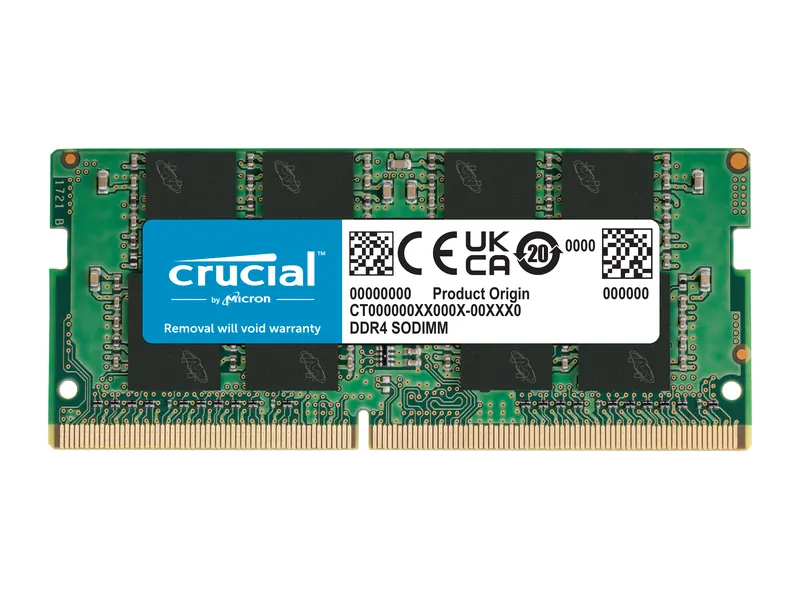
The module to buy if an older laptop has 4GB or 8GB in a single slot and you want to add memory for as little as possible. Crucial is Micron's own brand, and the 10-year warranty is one of the longest here. It will clock down if your laptop runs slower DDR4.
- Type
- DDR4 SO-DIMM (260-pin)
- Capacity
- 8GB (1 x 8GB)
- Speed
- 3200 MT/s, CL22
- Voltage
- 1.2V
- Warranty
- 10 years
G.Skill Ripjaws 16GB DDR4-3200 CL22 SO-DIMM (F4-3200C22S-16GRS)
A known-brand 16GB DDR4 stick for 2021–2023 laptops that need a single-module jump to 16GB. Timings are standard JEDEC, not an overclocked profile. Stock was often thinner than the Crucial 16GB, so have the fallback ready.
- Type
- DDR4 SO-DIMM (260-pin)
- Capacity
- 16GB (1 x 16GB)
- Speed
- 3200 MT/s, CL22-22-22-52
- Voltage
- 1.20V
- Warranty
- 5 years
Crucial Basics 16GB DDR4-3200 SO-DIMM
Crucial Basics is the value line: the same Micron memory with simpler packaging and a shorter warranty. Use it if the Ripjaws is out of stock and you want 16GB of DDR4 from a brand you can trust. Compare it with the standard Crucial 16GB below, which often costs little more.
- Type
- DDR4 SO-DIMM (260-pin)
- Capacity
- 16GB (1 x 16GB)
- Speed
- 3200 MT/s, CL22
- Voltage
- 1.2V
- Warranty
- Limited, as listed
Crucial 16GB DDR4-3200 CL22 SO-DIMM (CT16G4SFRA32A)
Our default DDR4 recommendation, and the best RAM for laptop upgrades on older machines. Standard 3200 MT/s CL22, 1.2V, a 10-year warranty, and a compatibility checker for the exact model. Pair it with the 8GB stick above if you have two slots and want matched capacity.
- Type
- DDR4 SO-DIMM (260-pin)
- Capacity
- 16GB (1 x 16GB)
- Speed
- 3200 MT/s, CL22
- Voltage
- 1.2V
- Warranty
- 10 years
ADATA Premier 8GB DDR5-5600 SO-DIMM
A single 8GB DDR5 stick for laptops with one occupied slot and one free. DDR5 prices have risen sharply, so an 8GB module is often the affordable way to add capacity. The Premier line carries a lifetime warranty, and 5600 MT/s suits current Intel Core Ultra and AMD Ryzen 7040 platforms.
- Type
- DDR5 SO-DIMM (260-pin)
- Capacity
- 8GB (1 x 8GB)
- Speed
- 5600 MT/s
- Voltage
- 1.1V
- Warranty
- Lifetime
ADATA Premier 16GB DDR5-5600 SO-DIMM
The value 16GB DDR5 module. If you are taking a DDR5 laptop from 16GB to 32GB, two of these often cost less than a single premium kit. Lifetime warranty and standard 1.1V operation. Confirm the live price, because this category moves more than DDR4.
- Type
- DDR5 SO-DIMM (260-pin)
- Capacity
- 16GB (1 x 16GB)
- Speed
- 5600 MT/s
- Voltage
- 1.1V
- Warranty
- Lifetime
G.Skill Ripjaws 16GB DDR5-5600 CL46 SO-DIMM (F5-5600S4645A16GX1)
A 16GB DDR5 stick with published timings rather than a vague speed rating: CL46 at 1.10V, the JEDEC standard for 5600 MT/s. A good choice when you want one module now and a matching second one later, and you care about the timing set being written down.
- Type
- DDR5 SO-DIMM (260-pin)
- Capacity
- 16GB (1 x 16GB)
- Speed
- 5600 MT/s, CL46
- Voltage
- 1.10V
- Warranty
- Lifetime, as listed
Kingston 16GB DDR5-4800 CL40 SO-DIMM (KVR48S40BS8-16)
4800 MT/s is the speed of the first DDR5 laptop platform, Intel 12th generation, and some of those machines are fussy about faster modules. This Kingston part matches that specification at CL40. ValueRAM is widely validated in business machines.
- Type
- DDR5 SO-DIMM (260-pin)
- Capacity
- 16GB (1 x 16GB)
- Speed
- 4800 MT/s, CL40
- Voltage
- 1.1V
- Warranty
- Lifetime
Crucial 16GB DDR5-5600 CL46 SO-DIMM (CT16G56C46S5)
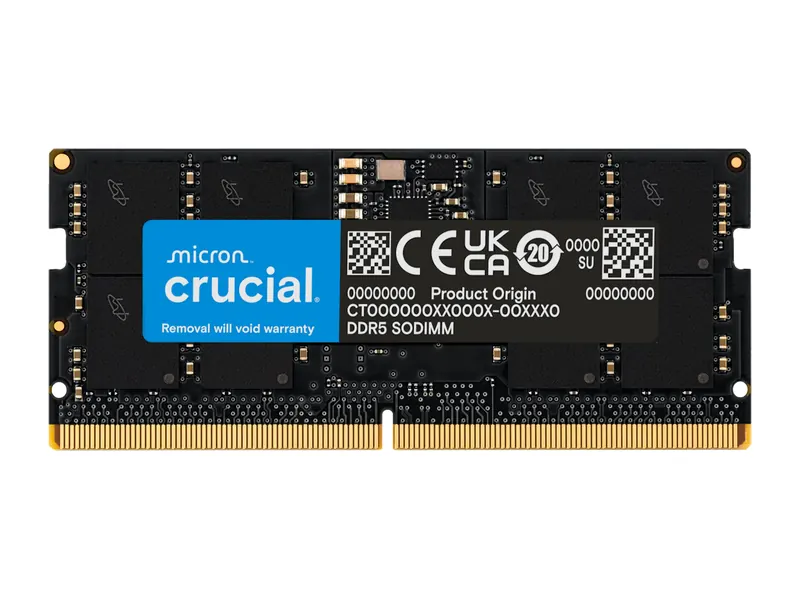
The best RAM for laptop upgrades on current machines. 5600 MT/s at CL46, first-party Micron chips, a 5-year warranty, and Crucial's compatibility tool that tells you the exact maximum your model accepts. It usually costs a little more than the ADATA and G.Skill sticks, and the validation is why.
- Type
- DDR5 SO-DIMM (260-pin)
- Capacity
- 16GB (1 x 16GB)
- Speed
- 5600 MT/s, CL46
- Voltage
- 1.1V
- Warranty
- 5 years
Kingston ValueRAM 16GB DDR5-5600 CL46 SO-DIMM 1Rx8 (KVR56S46BS8-16)
The premium pick, and the one to choose when your laptop's manual names a specific Kingston part or when you want single-rank 1Rx8 organisation, which some OEM machines prefer. ValueRAM is the line system builders and IT departments use because of the long validation list.
- Type
- DDR5 SO-DIMM (260-pin)
- Capacity
- 16GB (1 x 16GB)
- Speed
- 5600 MT/s, CL46
- Organisation
- 1Rx8 (single rank)
- Warranty
- 3 years
How to choose RAM for a laptop
Work through the checks in this order.
- Confirm there is a slot. Many thin laptops use soldered memory. If there is no SO-DIMM slot, stop here.
- Match the generation and the speed. DDR4 or DDR5, then 3200, 4800 or 5600 MT/s as the laptop specifies. A faster stick will usually run at the laptop's speed, but a first-generation DDR5 machine may refuse a 5600 module.
- Match the form factor. These are all SO-DIMM laptop modules, not desktop DIMMs.
- Plan the total capacity. 16GB is the everyday target. Leave room for a second stick if you have two slots.
- Check the live price. DRAM pricing in 2026 can make a 16GB upgrade look expensive against a new laptop. Compare both before you order.
How to install RAM in a laptop
Shut the laptop down fully, unplug it, and if the service manual says so, disconnect the battery. Use an anti-static strap or touch a metal chassis first. Open the bottom cover, release the side clips on the existing module if you are replacing it, and seat the new SO-DIMM at the angle the slot is built for until the clips lock.
Opening the bottom cover does not void the warranty in India for most brands, but check the policy first. After you close it up, confirm in Task Manager or the BIOS that the new capacity and speed are visible. If the laptop will not boot, reseat the module before you assume it is faulty.
Best RAM for laptop for students
Students should aim for 16GB. On a DDR4 machine that is the Crucial 16GB DDR4-3200. On a current DDR5 machine it is the Crucial 16GB DDR5-5600. An 8GB stick is only a complement for a second slot, not a complete upgrade from 8GB to a comfortable Windows 11 setup.
Best RAM for laptop gaming
Games care about capacity and about dual-channel memory, especially on integrated graphics. 16GB in two sticks is the best RAM for laptop gaming at this level. 32GB helps if you stream or keep a browser and Discord open beside a heavy title. The generation still has to match the laptop: a DDR5 gaming machine wants the 5600 MT/s Crucial or G.Skill stick, not a DDR4 module from the top of this list.
Which RAM brand is best for a laptop in India?
Crucial, Kingston, G.Skill and ADATA are all fine when the specification matches. Crucial is our default because of the compatibility scanner and the warranty. Kingston ValueRAM is the conservative choice for business laptops and first-generation DDR5 machines. G.Skill and ADATA are the value alternatives when those listings are cheaper and in stock. Brand is a weaker signal than generation, speed and capacity.
Is a laptop RAM upgrade worth it in 2026?
Yes, if the laptop has a free slot and you are on 8GB, or if you can move a 16GB machine to 32GB for heavy work. It is the cheapest way to make an existing laptop feel new. It is not worth it if memory is soldered, if you already have 16GB and only browse, or if the live price of two DDR5 sticks is close to a newer 16GB or 32GB laptop. Run that comparison before you order.
Where this page sits in the component guides
This is the SO-DIMM buying guide. The neighbouring pages are PC components, best SSD for laptop, best hard disk, laptops by RAM and 8GB vs 16GB RAM. For a single stick to fill a free slot, see our best 8GB DDR4 laptop RAM picks.
Frequently asked questions
What is the best RAM for laptop upgrades in 2026?
The Crucial 16GB DDR4-3200 for older machines, and the Crucial 16GB DDR5-5600 for current machines. Match the generation first. The best RAM for laptop use is the one your model actually accepts.
Can I put DDR5 RAM in a DDR4 laptop?
No. The slots are keyed differently and the modules are not interchangeable. Check the service manual or a compatibility tool before you buy.
Is 8GB enough for a laptop in 2026?
It will run Windows 11 for light work, but 16GB is the sensible everyday target. If your laptop has a free slot, upgrading from 8GB is usually the highest-value change you can make.
Will faster RAM make my laptop quicker?
Only within the speed the laptop supports. A 5600 MT/s stick in a 4800 MT/s machine will run at 4800, and some early DDR5 laptops prefer the 4800 module outright. Capacity and dual-channel matter more for everyday use.
Does installing RAM void my laptop warranty in India?
Usually not, if you open the bottom cover carefully and do not damage the machine. Check the brand's policy first, and keep the old module.
The final word
The best RAM for laptop upgrades is a matched SO-DIMM that fills you out to 16GB, or to 32GB if your work needs it. Crucial is the default brand on both DDR4 and DDR5, with Kingston the careful pick for fussy first-generation DDR5 machines.
Confirm the slot and the generation before you order, then check the live price. If the memory is soldered, a new laptop from our laptops-by-RAM guide is the real upgrade path.
Last updated on . Specifications, stock and prices change frequently. Always check the live listing before you buy.
More buying guides

Best laptops under ₹50,000
Looking for the best laptop under 50000 in India? 7 picks for students, home and office, compared on verified specs with honest pros, cons and buying tips.
Read guide →
Best laptops for students
Need the best laptop for students in India? 8 verified picks for CSE, engineering, commerce, design and school, matched to your course and your budget.
Read guide →
Best laptops under ₹1 lakh
Best laptop under 1 lakh in India: 8 Core Ultra, Ryzen AI, OLED and MacBook Neo picks compared on verified specs, with honest pros, cons and buying tips.
Read guide →