10 Best MSI Laptops in India (November 2026): Every Budget Covered


The best MSI laptop for you depends on the series more than the badge. MSI is best known for gaming, with Thin, Cyborg and Katana covering entry to enthusiast cards, but the Modern line is a sharp office and student laptop, and Prestige is the creator range with brighter screens. Two laptops can share a series name and differ by a whole class of chip, graphics and screen. This guide maps every series we found in stock to a budget and names the best MSI laptop in each one.
MSI sits in our best laptop brands in India list as the gaming and value-office pick: strong graphics for the money, with a thinner service network than HP or Dell. We checked every configuration below on 11 November 2026, kept ten that were in stock, and wrote each note around the processor, memory, graphics and weight. Listings change quickly, so confirm the live price before you pay.
On this page
- Best MSI laptop picks at a glance
- MSI laptop series explained: Modern, Thin, Cyborg, Katana and Prestige
- The 10 best MSI laptops in India, by budget
- Best MSI laptop for students
- Best MSI laptop for gaming
- Best MSI laptop for coding and programming
- Best MSI laptop for office use, work from home and everyday use
- Best MSI laptop for video editing
- MSI Thin 15: should you buy it?
- Best MSI laptop under ₹50,000, ₹60,000, ₹70,000, ₹80,000 and ₹1 lakh
- Is MSI a good laptop brand? MSI vs HP, Lenovo, ASUS and Acer
- MSI service centres, warranty check and support in India
- How to choose the best MSI laptop for you
- FAQs
- Final word
- More buying guides
Best MSI laptop picks at a glance
Here is the short list. Each row links to the full pick below. Read the graphics and the memory column before the model name: the best MSI laptop for a college bag and the best MSI laptop for gaming are very different machines.
| Budget band | Best MSI laptop | Series | Best for |
|---|---|---|---|
| Under ₹55,000 | Modern 15 (Core i5-1335U, 16GB) | Modern | Students and office work |
| Under ₹65,000 | Modern 14 (Ryzen 5 7430U, 16GB) | Modern | Light 14-inch carry |
| Under ₹70,000 | Modern 14 (Ryzen 7 7730U, 16GB) | Modern | Coding and heavy tabs |
| Under ₹80,000 | Modern 15 H (Core i7-13620H, 16GB) | Modern | H-series power without a GPU |
| Under ₹90,000 | Thin 15 (Core i5-13420H, RTX 3050 4GB) | Thin | Entry gaming, light chassis |
| Under ₹95,000 | Thin A15 (Ryzen 5 7535HS, RTX 3050 4GB) | Thin | AMD entry gaming |
| Around ₹1.13 lakh | Cyborg 15 (Core 5 210H, RTX 3050 6GB) | Cyborg | Entry gaming with 6GB video memory |
| Around ₹1.39 lakh | Katana 15 HX (Core i5-14450HX, RTX 5050) | Katana | Current-generation mid gaming |
| Around ₹1.40 lakh | Prestige 16 Studio (Core i7-13700H, RTX 4050) | Prestige | Creators, QHD+ screen |
| Around ₹1.80 lakh | Katana 15 HX (Core i9-14900HX, RTX 5050, QHD) | Katana | Flagship gaming and a sharper panel |
If you want one answer, the best MSI laptop for most buyers who do not need a graphics card is the Modern 15 with the Core i5-1335U and 16GB of memory. Gamers should start at the Thin 15 with an RTX 3050, which is the light MSI gaming laptop most Indian buyers actually find, and stretch to a Cyborg or Katana if they can pay for more video memory.
MSI laptop series explained: Modern, Thin, Cyborg, Katana and Prestige
You cannot pick the best MSI laptop without knowing what each series name means, because MSI reuses similar 14-inch and 15-inch sizes across very different hardware. Here is the map, from the cheapest line we found in stock to the most expensive.
Modern: the office and student line
Modern 14 and Modern 15 are thin Windows laptops with integrated graphics. They are the best MSI laptop choice for study, office work and work from home. Memory on several Modern 15 models is onboard and capped at 16GB, so read that line before you pay. The Modern 15 H adds an H-series Core i7 or i9 without a dedicated GPU.
Thin: the light gaming line
Thin 15 and Thin A15 are MSI's lightest gaming laptops, usually around 1.8 to 1.86 kg, with a 144Hz screen and an RTX 3050. The Intel Thin 15 uses a Core i5-13420H or Core i7-13620H; the Thin A15 uses a Ryzen 5 7535HS. The trade-off is often 4GB of video memory, which is tight in newer games.
Cyborg: the value gaming line
Cyborg 15 and Cyborg 15 Max sit above Thin. The Cyborg 15 we found ships with an RTX 3050 6GB, which is the upgrade worth paying for if the Thin's 4GB card is the sticking point. Cyborg 15 Max moves up to an RTX 5060 in a 2 kg body.
Katana: the mainstream gaming line
Katana 15 and Katana 15 HX are thicker 15.6-inch gaming laptops with stronger cooling and, in the HX models, 14th Gen Intel chips and RTX 5050 graphics. The i9 version adds a 165Hz QHD screen. We did not find a Sword or Crosshair laptop in stock when we checked, so Katana is the current mid-range stand-in.
Prestige: the creator line
Prestige is the best MSI laptop range for photo and video work: thinner bodies, taller or sharper screens, and in the Prestige 16 Studio, an RTX 4050 with a QHD+ 165Hz panel. Prestige 13 and 14 Evo models exist too; we kept the Studio because the screen and GPU are the reason to pay for this series.
Stealth, Raider and other lines
MSI also sells Stealth, Raider and older Bravo models. The Stealth 14 AI Studio we opened was listed, but we did not treat it as a clean in-stock pick for this list. Bravo 15 uses a much older Ryzen 7 4800H and 8GB of memory, so we left it out.
The 10 best MSI laptops in India, by budget
These are the ten configurations we would buy, from the cheapest Modern 15 to the Katana 15 HX with a QHD screen. Each one was listed in stock when we checked on 11 November 2026. Each note names the weak spot as clearly as the strength.
MSI Modern 15 B13M-289IN (Core i5-1335U, 16GB/512GB)
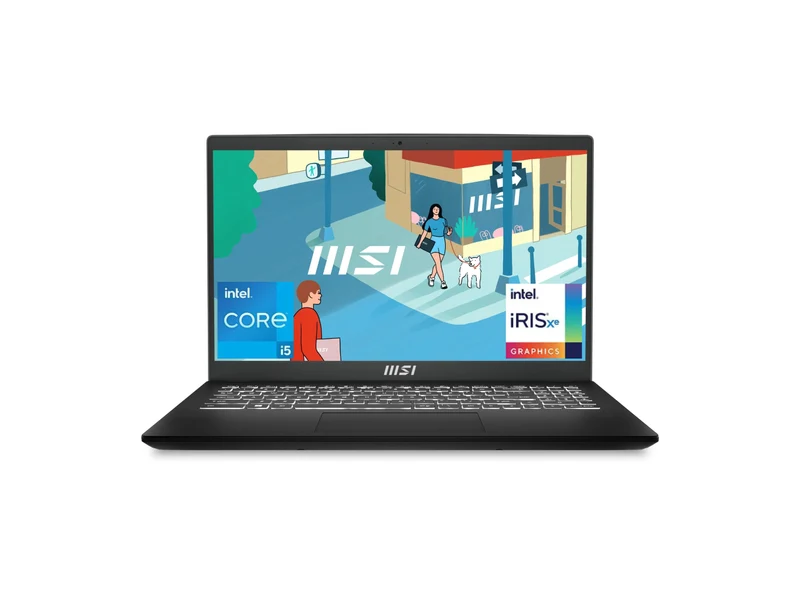
This is the best MSI laptop for most people who do not need a graphics card: a 10-core Core i5, 16GB of memory and a 1.7 kg body at the lowest price on this list. It handles notes, a browser full of tabs, Excel and video calls without the 8GB ceiling of cheaper rivals. The memory is onboard and cannot grow later, the 39Wh-class battery is modest, and the 60Hz 45% NTSC panel is a basic office screen, not a design display.
- Processor
- Intel Core i5-1335U (10 cores / 12 threads, up to 4.6 GHz)
- Graphics
- Intel Iris Xe Graphics (integrated)
- Memory
- 16GB DDR4 (onboard, 16GB maximum)
- Storage
- 512GB PCIe Gen3 NVMe SSD
- Display
- 15.6-inch FHD IPS-level, 60Hz
- Weight
- 1.7 kg
MSI Modern 14 C7M-104IN (Ryzen 5 7430U, 16GB/512GB)
At 1.4 kg this is the MSI laptop to carry every day. The Ryzen 5 7430U and 16GB of memory are enough for study, office work and a video call, and the listing includes Office 2024. It is not a gaming laptop, despite some listings using that word; there is no dedicated GPU. Choose it for the size and the weight, not for games.
- Processor
- AMD Ryzen 5 7430U
- Graphics
- AMD Radeon Graphics (integrated)
- Memory
- 16GB
- Storage
- 512GB NVMe SSD
- Display
- 14-inch FHD, 60Hz
- Weight
- 1.4 kg
MSI Modern 14 C7M-101IN (Ryzen 7 7730U, 16GB/512GB)
Eight cores in a 1.4 kg 14-inch body make this the best MSI laptop for coding on a budget. Compiles and a few Docker containers feel clearly better than on the Ryzen 5 model above, and Office is bundled. It is still a U-series chip with integrated graphics, so it is not a machine-learning or gaming laptop. Confirm the memory is slotted if you think you will want 32GB later.
- Processor
- AMD Ryzen 7 7730U (8 cores / 16 threads)
- Graphics
- AMD Radeon Graphics (integrated)
- Memory
- 16GB
- Storage
- 512GB NVMe SSD
- Display
- 14-inch FHD, 60Hz
- Weight
- 1.4 kg
MSI Modern 15 H B13M-225IN (Core i7-13620H, 16GB/512GB)
This is the cheapest way to get an H-series Core i7 in an MSI laptop that still looks like an office machine. Ten cores help with large Excel models, virtual machines and code builds. It has no dedicated graphics, so it is not a gaming or 3D machine, and at 1.9 kg it is heavier than the Modern 14. Office 2021 is bundled.
- Processor
- Intel Core i7-13620H (10 cores, up to 4.9 GHz)
- Graphics
- Intel graphics (integrated)
- Memory
- 16GB
- Storage
- 512GB NVMe SSD
- Display
- 15.6-inch, 60Hz
- Weight
- 1.9 kg
MSI Thin 15 B13UC-125IN (Core i5-13420H, RTX 3050 4GB, 16GB/512GB)
The Thin 15 is the MSI laptop most Indian buyers should look at first if they want a graphics card: a 144Hz screen, an RTX 3050 and a body that is actually light enough for class. Memory can grow to 64GB, which is a real advantage over soldered office laptops. The 4GB of video memory is the limit in newer games at high textures, so treat it as an esports and 1080p-medium machine. This is the Thin 15 configuration we would buy; a slightly dearer B13UC-1805IN listing of the same chip and GPU was also in stock.
- Processor
- Intel Core i5-13420H (8 cores, up to 4.6 GHz)
- Graphics
- NVIDIA GeForce RTX 3050 4GB GDDR6
- Memory
- 16GB DDR4 (upgradeable to 64GB)
- Storage
- 512GB NVMe PCIe Gen4 SSD
- Display
- 15.6-inch FHD IPS-level, 144Hz
- Weight
- 1.86 kg
MSI Thin A15 B7UC-102IN (Ryzen 5 7535HS, RTX 3050 4GB, 16GB/512GB)
The AMD Thin A15 is a hair lighter than the Intel Thin 15 and uses DDR5 memory with the same RTX 3050 4GB and 144Hz screen. The six-core Ryzen 5 7535HS is a strong partner for this GPU in games and everyday work. It has the same 4GB video-memory ceiling as the Intel model, so do not expect a different class of game performance. Pick it if you prefer Ryzen or if it is cheaper on the day you buy.
- Processor
- AMD Ryzen 5 7535HS (6 cores / 12 threads)
- Graphics
- NVIDIA GeForce RTX 3050 4GB GDDR6
- Memory
- 16GB DDR5
- Storage
- 512GB NVMe PCIe Gen4 SSD
- Display
- 15.6-inch FHD IPS-level, 144Hz
- Weight
- 1.8 kg
MSI Cyborg 15 A2RUDX-111IN (Core 5 210H, RTX 3050 6GB, 16GB/512GB)
The extra 2GB of video memory is the reason to move from a Thin 15 to this Cyborg 15. Newer games hold textures more comfortably at 1080p, and the Core 5 210H is a current H-series chip. You pay clearly more than the Thin, and at just under 2 kg it is no longer a light laptop. A Core 7 240H version of the same 6GB RTX 3050 Cyborg was also in stock at a higher price; buy this one unless the gap shrinks.
- Processor
- Intel Core 5 210H (8 cores, up to 4.8 GHz)
- Graphics
- NVIDIA GeForce RTX 3050 6GB GDDR6
- Memory
- 16GB
- Storage
- 512GB NVMe SSD
- Display
- 15.6-inch FHD, 144Hz
- Weight
- 1.98 kg
MSI Katana 15 HX B14WEK-104IN (Core i5-14450HX, RTX 5050, 16GB/512GB)
This Katana 15 HX is the step into a current-generation NVIDIA card. An RTX 5050 with a 14th Gen HX chip is a different class from the RTX 3050 Thins, and it is the best MSI laptop for gaming at this price if you will actually use the GPU. It is a 2.4 kg desk-first machine with a 512GB SSD, so plan a second drive or a cloud library. Confirm the video-memory size on the live listing, because MSI sells more than one RTX 5050 configuration.
- Processor
- Intel Core i5-14450HX (14th Gen)
- Graphics
- NVIDIA GeForce RTX 5050
- Memory
- 16GB
- Storage
- 512GB NVMe SSD
- Display
- 15.6-inch FHD, 144Hz
- Weight
- 2.4 kg
MSI Prestige 16 Studio A13VE-031IN (Core i7-13700H, RTX 4050 6GB, 16GB/1TB)
The Prestige 16 Studio is the best MSI laptop for photo and video work: a 16-inch QHD+ 165Hz screen, an RTX 4050 with 6GB of memory and a 1TB SSD. The card also has frame generation, which the RTX 3050 models do not. It is heavier than a Modern and costs as much as the Katana 15 HX above, so buy it for the screen and the quieter creator chassis, not as a pure games machine.
- Processor
- Intel Core i7-13700H (13th Gen)
- Graphics
- NVIDIA GeForce RTX 4050 6GB GDDR6
- Memory
- 16GB
- Storage
- 1TB NVMe SSD
- Display
- 16-inch QHD+ 165Hz
- Weight
- 2.1 kg
MSI Katana 15 HX B14WEK-264IN (Core i9-14900HX, RTX 5050 8GB, 16GB/1TB, QHD)
A 24-core i9, an 8GB RTX 5050 and a 165Hz QHD screen make this the best MSI laptop for gaming without stepping into the much dearer Cyborg 15 Max or Katana RTX 5060 range. Dual memory slots and a 1TB SSD are the right foundation. It is heavy, it will be loud under load, and at this price you should also compare the Cyborg 15 Max with an RTX 5060 and our best gaming laptops under ₹2 lakh.
- Processor
- Intel Core i9-14900HX (24 cores / 32 threads, up to 5.8 GHz)
- Graphics
- NVIDIA GeForce RTX 5050 8GB GDDR7
- Memory
- 16GB DDR5-5600 (two slots, up to 96GB)
- Storage
- 1TB SSD
- Display
- 15.6-inch QHD (2560×1440) IPS-level, 165Hz
- Weight
- 2.4 kg
Best MSI laptop for students
For students, the best MSI laptop is the one with 16GB of memory, a weight you can carry to class, and a battery that lasts a lecture. These three cover most courses.
- Modern 15 (Core i5-1335U, 16GB): the default pick for most students. Enough memory for notes, research tabs and online classes, at 1.7 kg.
- Modern 14 (Ryzen 5 7430U): the lighter 14-inch bag laptop, at 1.4 kg, with Office bundled.
- Thin 15 (RTX 3050 4GB): the pick if the same laptop also has to play games or run a little CUDA work after class.
For other brands at student budgets, read our best laptops for students in India guide.
Best MSI laptop for gaming
When choosing the best MSI laptop for gaming, the graphics card and its memory decide almost everything. MSI covers the entry RTX 3050, the mid RTX 4050 and 5050, and a 5060 at the top of what we found in stock.
- Thin 15 (RTX 3050 4GB): the light entry gaming laptop, best for esports and 1080p medium.
- Cyborg 15 (RTX 3050 6GB): the same chip with more video memory, which matters in newer titles.
- Katana 15 HX (RTX 5050): the first current-generation card on this list.
- Katana 15 HX i9 (RTX 5050 8GB, QHD): the no-compromise pick we would actually buy at the top of the range.
A Cyborg 15 Max with an RTX 5060 8GB was also in stock at a higher price. Compare graphics tiers on our laptops by graphics card page, and read RTX 3050 vs RTX 4050 before you choose a tier.
Best MSI laptop for coding and programming
The best MSI laptop for coding wants cores, 16GB of memory and a screen you can sit with for hours. A dedicated GPU only matters for machine learning or game development.
- Modern 14 (Ryzen 7 7730U): eight cores and a 1.4 kg body make it the best MSI laptop for coding below ₹70,000.
- Modern 15 H (Core i7-13620H): faster in long builds thanks to the H-series chip.
- Prestige 16 Studio (RTX 4050): the one to buy if you also train small models or use CUDA, with a 16-inch QHD+ screen for more editor space.
If you run Android emulators and Docker together, plan for 32GB on a laptop with free slots, such as the Thin 15 or the Katana 15 HX. The Modern 15's memory is onboard at 16GB.
Best MSI laptop for office use, work from home and everyday use
The best MSI laptop for office work rewards you with 16GB of memory, a usable webcam and keyboard, and a weight you will actually take to meetings.
- Modern 15 (Core i5-1335U): the basic everyday pick for email, documents and video calls.
- Modern 14 (Ryzen 5 7430U): the better pick if you commute with a laptop every day.
- Modern 15 H (Core i7-13620H): the pick for heavier spreadsheets and many apps at once.
Best MSI laptop for video editing
The best MSI laptop for video editing needs a dedicated GPU for timeline playback and exports, at least 16GB of memory and a fast SSD with room for footage.
- Prestige 16 Studio (RTX 4050, 1TB, QHD+): the first pick, because the screen and the 1TB SSD match the work.
- Katana 15 HX i9 (RTX 5050 8GB, QHD): more GPU memory and a 24-core chip for heavier exports.
- Cyborg 15 (RTX 3050 6GB): the lowest-price GPU option we would use for 1080p editing, not for 4K colour work.
Plan to add memory: 32GB is a sensible target for 4K editing, and the Katana 15 HX can take more.
MSI Thin 15: should you buy it?
The MSI Thin 15 is the model most buyers land on when they search for an MSI gaming laptop, and it is in this guide for a reason. The B13UC configuration with a Core i5-13420H, an RTX 3050 4GB, 16GB of DDR4 and a 144Hz screen was in stock at more than one listing when we checked. It is light for a gaming laptop, the memory can be upgraded, and it is the cheapest honest RTX MSI laptop we found.
Buy it if you want esports and older or mid-settings 1080p games in a bag you can carry. Skip it if you need 6GB of video memory; pay the extra for the Cyborg 15 with an RTX 3050 6GB instead. An Intel Core i7-13620H Thin 15 with the same 4GB RTX 3050 was also listed, but the GPU, not the processor, is the limit on that machine.
Best MSI laptop under ₹50,000, ₹60,000, ₹70,000, ₹80,000 and ₹1 lakh
Budget questions are the most common MSI searches, so here is what the range actually offered in each band when we checked on 11 November 2026.
Under ₹50,000: we found no MSI laptop we would recommend. The Modern 15 below sat just over this line. See our best laptops under ₹50,000 for other brands.
Under ₹55,000 and ₹60,000: the Modern 15 with 16GB is the best MSI laptop in this band. See our best laptops under ₹55,000.
Under ₹70,000: the Modern 14 Ryzen 5 and the Modern 14 Ryzen 7. See our best laptops under ₹70,000.
Under ₹80,000: the Modern 15 H with the Core i7-13620H. See our best laptops under ₹80,000.
Under ₹1 lakh: the Thin 15 and the Thin A15. For the wider market, start at our best gaming laptops under ₹1 lakh.
Is MSI a good laptop brand? MSI vs HP, Lenovo, ASUS and Acer
MSI is a good laptop brand in India when you want a graphics card or a sharply priced 16GB office laptop. It is weaker on service coverage in smaller towns and on battery life in the thin gaming models.
MSI vs HP: HP has the wider service network and a strong Victus range. MSI often gives a lighter gaming body, as in the Thin 15, or a cheaper 16GB Modern. See our HP laptops guide.
MSI vs Lenovo: Lenovo wins on keyboards and on the LOQ and Legion gaming range. MSI wins on some mid-range graphics prices and on the Modern 15's specifications at its price. See our Lenovo laptops guide.
MSI vs ASUS: ASUS usually has the better screens, including OLED at mid prices, and a wider TUF and ROG range. MSI is often lighter at the same GPU tier. See our ASUS laptops guide.
MSI vs Acer: Acer often undercuts MSI on RTX 4050 laptops such as the Aspire 7. MSI's Thin 15 is lighter than most Acer ALG models. See our Acer laptops guide and the HP vs Dell vs Lenovo vs ASUS comparison.
MSI service centres, warranty check and support in India
Even the best MSI laptop needs good after-sales support. MSI has authorised service centres in large Indian cities, but coverage in smaller towns is thinner than HP, Dell or Lenovo. Before you buy, look up the nearest centre to your home.
- Warranty check: enter the serial number or product key on MSI support to see the warranty status, download drivers and register the product.
- Register on day one: registration speeds up claims. Several listings mention a two-year on-site warranty; on-site cover is only for selected regions, so read the fine print.
- Extended warranty: worth considering on Katana, Cyborg and Prestige models, where a motherboard or GPU repair costs a large part of the price.
How to choose the best MSI laptop for you
Five checks settle most best MSI laptop decisions.
- Match the series to the job. Modern for study and office, Thin and Cyborg for entry gaming, Katana for stronger GPUs, and Prestige for a better screen.
- Check the memory. Prefer 16GB. On the Modern 15, that 16GB may be onboard and final. On Thin and Katana, slots usually let you grow later.
- Read the GPU memory, not just the name. An RTX 3050 4GB and an RTX 3050 6GB are not the same card in 2026 games.
- Read the processor suffix. U is for battery life, H and HX are for power. A Core i5 H can beat a Core i7 U. See U vs H series laptop processors and i5 vs i7 laptop.
- Weigh the chassis. Thin 15 is the one you carry. Katana 15 HX stays on a desk.
If you are still choosing a budget, start at our laptops hub or the laptop buying guide for India.
Frequently asked questions
Which is the best MSI laptop in India?
For most buyers who do not need a graphics card, the best MSI laptop is the Modern 15 with the Core i5-1335U and 16GB of memory. For gaming, start with the Thin 15 and an RTX 3050, or the Cyborg 15 if you want 6GB of video memory. The Katana 15 HX with an RTX 5050 is the mid-range step up, and the i9 QHD version is the flagship we would buy.
Which MSI laptop is best for students?
The Modern 15 with 16GB of memory is the best MSI laptop for most students. Students who carry a laptop all day should look at the 1.4 kg Modern 14, and students who also game should look at the Thin 15.
Is MSI a good laptop brand in India?
Yes, especially for gaming and for value office laptops such as the Modern 15. MSI gives strong graphics and specifications per rupee. Its service network is thinner in small towns than HP or Dell, so check the nearest service centre before you buy.
Which MSI laptop is best for gaming?
The Thin 15 with an RTX 3050 4GB is the best entry MSI gaming laptop. The Cyborg 15 with an RTX 3050 6GB is the better pick if you can spend more, and the Katana 15 HX with an RTX 5050 is the mid-range choice. The Katana 15 HX i9 with 8GB of video memory and a QHD screen is the top pick we verified.
Should I buy the MSI Thin 15?
Yes, if you want a light gaming laptop for esports and 1080p medium settings, and you can live with 4GB of video memory. Choose the Cyborg 15 instead if you want 6GB of memory on the same RTX 3050 chip.
Can I upgrade the RAM on an MSI laptop?
On many models, yes. The Thin 15 and the Katana 15 HX use slotted memory and can grow well past 16GB. The Modern 15 we recommend uses onboard 16GB that cannot be upgraded, so confirm the listing before you pay.
The final word
The best MSI laptop for most people is the Modern 15 with 16GB of memory: enough for study, office work and work from home, at the lowest price on this list. Move to the Modern 14 Ryzen 7 for coding in a lighter body, or the Modern 15 H if you want an H-series Core i7 without a GPU.
For gaming, the Thin 15 with an RTX 3050 is the entry pick, the Cyborg 15 adds 6GB of video memory, the Katana 15 HX steps up to an RTX 5050, and the i9 QHD Katana is the flagship we would buy. In every case, read the memory line and the GPU memory line on the live listing before you pay.
Last updated on . Specifications, stock and prices change frequently. Always check the live listing before you buy.
More buying guides

Best laptops under ₹55,000
Searching for the best laptop under 55000 in India? 7 verified picks with Core i5, i7 and Ryzen 5 chips, 16GB RAM options and honest pros and cons.
Read guide →
Best gaming laptops under ₹1 lakh
Best gaming laptop under 1 lakh in India: 7 RTX picks from Lenovo LOQ, Acer, ASUS TUF, MSI and Dell, with verified GPU wattage, specs and honest advice.
Read guide →
Best gaming laptops under ₹2 lakh
Best gaming laptop under 2 lakh in India: 7 RTX 5060 and 5050 picks from Lenovo LOQ and Legion, ASUS TUF, MSI and HP Omen, on verified specs.
Read guide →