10 Best Keyboards for Laptop and PC in India (November 2026)


The best keyboard for laptop users turns a cramped, shallow built-in keyboard into a full-size setup you can type on all day. Pair an external keyboard with a laptop stand and your screen rises to eye level while your hands stay low and relaxed, which is far kinder to your neck and wrists than hunching over the laptop deck.
We picked ten keyboards that work just as well with a laptop or a desktop PC, from a dependable wired keyboard in the lowest price bracket to a quiet premium typing keyboard, a Bluetooth keyboard that slips into a bag and two mechanical keyboards for gaming and coding. Every one was verified in stock in India on 31 October 2026. This page is part of our guide to laptop accessories, where you can find the other upgrades worth buying alongside a keyboard.
On this page
- How to choose the best keyboard for laptop use
- Membrane, scissor or mechanical: which keyboard for laptop typing?
- Best wired keyboard for laptop and PC on a budget
- Best wireless keyboard for laptop desks
- Best Bluetooth keyboard for laptop bags and travel
- Best gaming keyboard for laptop players
- Best premium keyboard for laptop work and typing
- All 10 keyboards compared
- Best keyboard for laptop by budget: under ₹300, ₹500, ₹1,000 and ₹2,000
- Best keyboard for typing all day
- Best keyboard for coding and programming
- Best keyboard for gaming on a laptop
- Best keyboard for office and work from home
- Best keyboard for students and beginners
- Best keyboard for Mac and MacBook
- Small and portable keyboards
- Backlit keyboards for typing in the dark
- Is a mechanical keyboard worth it for a laptop?
- Wired, wireless, Bluetooth or USB: which to buy?
- Setting up an external keyboard with your laptop
- More keyboard guides
- FAQs
- Final word
- More buying guides
How to choose the best keyboard for laptop use

Four questions narrow the best keyboard for laptop owners down quickly. Answer them in order and most of the list rules itself out.
1. How will it connect?
- Wired USB: the cheapest option, with zero lag and no batteries. It uses a USB-A port and adds a cable, which is fine on a fixed desk.
- 2.4GHz wireless: a small USB receiver gives a stable connection with almost no setup. It still takes a USB-A port.
- Bluetooth: no receiver, so every port stays free. This is the best choice for thin laptops and MacBooks that only have USB-C.
- Multi-mode: Bluetooth plus a receiver or cable, often with buttons to switch between two or three devices, such as a laptop, a tablet and a phone.
2. Which size and layout?
A full-size keyboard has a number pad, which accountants and anyone who types figures will miss on a laptop. A tenkeyless (TKL) or 75% layout drops the number pad, so your mouse sits closer and your shoulder stays relaxed. A compact keyboard is the easiest to carry. Look for the ₹ key and a standard Indian or US layout so symbols are where you expect them.
3. Which switch type?
Membrane keys are quiet and cheap, scissor-switch keys feel like a good laptop keyboard, and mechanical switches give the most precise, durable feel. The next section explains the difference.
4. Which operating system?
Most keyboards work with Windows out of the box. If you use a MacBook, iPad or Chromebook, choose a model that lists those systems, so the Command, Option and media keys behave as expected.
Membrane, scissor or mechanical: which keyboard for laptop typing?

The switch under each key decides how a keyboard feels, sounds and lasts. Choosing the right one matters more than any extra feature when you look for the best keyboard for laptop typing.
- Membrane: a rubber dome under each key. Soft, quiet and inexpensive, though keys feel mushier and wear faster. The Zebronics K65, Dell KB216 and HP K500F use membrane keys.
- Scissor-switch: a low-profile mechanism like most laptop keyboards, with short, stable key travel. It is the easiest switch to move to from a laptop. The HP 350 Compact, Logitech Pebble Keys 2 K380s and Logitech MX Keys S use scissor switches.
- Mechanical: a separate spring switch under every key. Precise and long-lasting, and on hot-swappable boards you can replace switches without soldering. Clicky (blue) switches are loud; linear switches are smooth and quieter. The EvoFox Katana X2 TKL and AULA F75 are mechanical.
If you share a room or join many calls, stay with membrane, scissor or linear mechanical switches. Save clicky blue switches for a private desk.
Best wired keyboard for laptop and PC on a budget
A wired keyboard is the simplest upgrade there is: plug it in and type. These two are the best keyboard for laptop buyers who want something dependable for the lowest price.
Zebronics K65 Wired Keyboard
The lowest-cost pick here and a sensible spare for any desk. The full layout includes a number pad and the ₹ key, and the tilt stand helps you find a comfortable angle. Key feel is basic, but for occasional typing it does the job, and it is the best keyboard for laptop users on the smallest budget.
- Connection
- Wired USB, 1.2 m cable
- Layout
- Full size, 104 keys with ₹ key
- Keys
- Membrane, UV-coated keycaps
- Extras
- Retractable stand, slim design
- Weight
- 390 g
- Warranty
- 1 year
Dell KB216 Wired Multimedia Keyboard
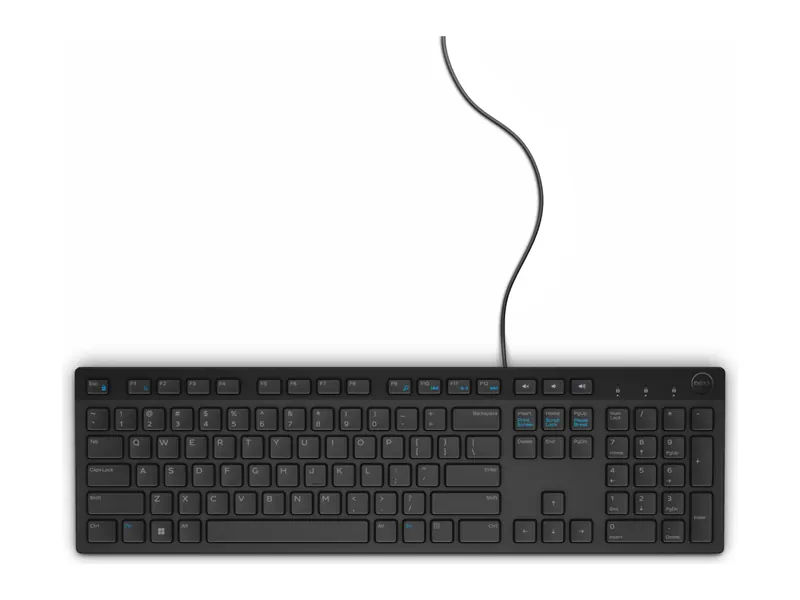
A long-time favourite in Indian offices. The low-profile chiclet keys feel close to a laptop keyboard, the media keys control volume and playback, and the spill-resistant design survives the odd splash of tea. It is the safe default and the best keyboard for laptop users at a fixed office desk.
- Connection
- Wired USB
- Layout
- Full size with number pad and multimedia keys
- Keys
- Low-profile chiclet membrane, spill resistant
- Works with
- Windows, Linux, ChromeOS, Android
- Weight
- 503 g
- Best for
- Office and home desks
Best wireless keyboard for laptop desks
Going wireless clears the cable clutter, which is why the best keyboard for laptop desks is often a wireless one. The first pick connects by Bluetooth or a receiver; the second comes with a matching mouse.
Portronics Bubble 3.0 Wireless Keyboard
Rare at this price: Bluetooth and a receiver in one keyboard, with switching between three devices and a rechargeable battery. The rounded keys are quiet and the full layout keeps the number pad. It is the best keyboard for laptop and phone switching on a budget.
- Connection
- Bluetooth 5.3 + 2.4GHz receiver
- Devices
- Up to 3, switchable
- Layout
- Full size with number pad
- Power
- Rechargeable via USB Type-C
- Extras
- Dual-angle stand, Copilot key
- Works with
- Windows, Android, iOS, tablets, smart TVs
Logitech MK215 Wireless Keyboard and Mouse Combo
One small receiver runs both the keyboard and the mouse, which saves a USB port on the laptop. The compact board keeps a number pad, and the batteries last a long time. It is the best keyboard for laptop desks that also need a mouse.
- Connection
- 2.4GHz, one receiver for both
- Layout
- Compact keyboard with number pad
- Battery
- Keyboard up to 2 years, mouse up to 5 months (claimed)
- Mouse
- Logitech M150 ambidextrous
- Works with
- Windows
- Warranty
- 3 years
Best Bluetooth keyboard for laptop bags and travel
A Bluetooth keyboard needs no receiver, so it is ideal for USB-C-only laptops, MacBooks and tablets. Both picks are slim enough to carry daily, and either is the best keyboard for laptop bags in its price bracket.
HP 350 Compact Multi-Device Bluetooth Keyboard
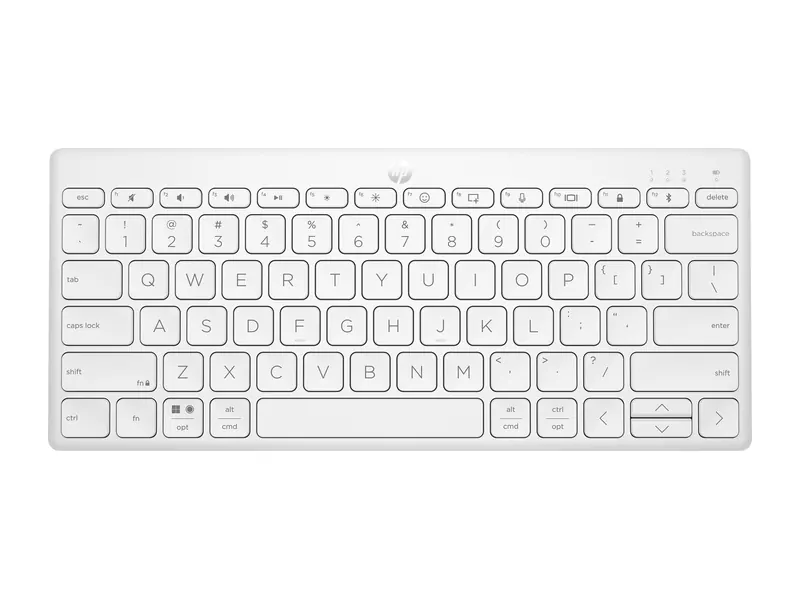
Small enough for a laptop sleeve, yet with standard-size keycaps that feel familiar straight away. It detects your operating system and maps keys to match, so it moves between a Windows laptop and a MacBook without fuss. The long battery life and three-year warranty make it the best keyboard for laptop travel at this price.
- Connection
- Bluetooth 5.2
- Devices
- Up to 3, with a switching key
- Keys
- Scissor switch, spill resistant
- Battery
- Up to 24 months on 2 AAA (included)
- Works with
- Windows, macOS, ChromeOS (auto-detect)
- Weight
- 340 g · 3-year warranty
Logitech Pebble Keys 2 K380s
The round, quiet keys and slim body make this a favourite for MacBook and iPad owners. Three Easy-Switch buttons hop between a laptop, a tablet and a phone, and the Fn keys can be set to your own shortcuts. For MacBook owners, it is the best keyboard for laptop and tablet switching below premium prices.
- Connection
- Bluetooth
- Devices
- Up to 3, Easy-Switch buttons
- Keys
- Round scissor keys, quiet
- Battery
- Up to 3 years (claimed), batteries included
- Works with
- Windows, macOS, iPadOS, ChromeOS
- Extras
- Customisable Fn keys via Logi Options+
Best gaming keyboard for laptop players
A good gaming keyboard registers several keys at once (anti-ghosting), lights up for night sessions and survives hard presses. These three cover a budget backlit board and two mechanical keyboards, and each is the best keyboard for laptop gaming at its price.
HP K500F Wired Gaming Keyboard
A sturdy metal-panel keyboard with a bright backlight and anti-ghosting on the 26 keys games use most. It is quieter than a mechanical board and the three-year warranty is generous for a budget gaming keyboard.
- Connection
- Wired USB
- Keys
- Membrane, double-injection keycaps
- Backlight
- Single colour or mixed colour
- Gaming
- 26 anti-ghosting keys
- Build
- Metal top panel, 680 g
- Warranty
- 3 years
EvoFox Katana X2 TKL Mechanical Keyboard
A genuine mechanical keyboard at a budget price, with hot-swappable switches so you can change the feel later. The compact TKL layout leaves room for a mouse. Clicky blue switches are loud, so it suits a private desk best.
- Connection
- Wired USB
- Layout
- Tenkeyless, 81 keys
- Switches
- Clicky blue, 3-pin hot-swappable
- Backlight
- 11 lighting modes
- Extras
- Volume knob
- Weight
- 615 g · 1-year warranty
AULA F75 Wireless Mechanical Keyboard
An enthusiast-style keyboard: a cushioned gasket mount, smooth pre-lubed linear switches and three ways to connect. It sounds deep rather than clacky, and it is as good for long typing and coding sessions as it is for games.
- Connection
- Bluetooth, 2.4GHz and USB-C wired
- Devices
- Up to 5
- Layout
- 75%, 80 keys with knob
- Switches
- Pre-lubed linear, 3/5-pin hot-swappable
- Build
- Gasket mount, RGB backlight
- Works with
- Windows, macOS, Linux
Best premium keyboard for laptop work and typing
If you type for a living, a premium keyboard pays for itself in comfort. This is the one we would buy for a long workday, and our pick for the best keyboard for laptop professionals.
Logitech MX Keys S
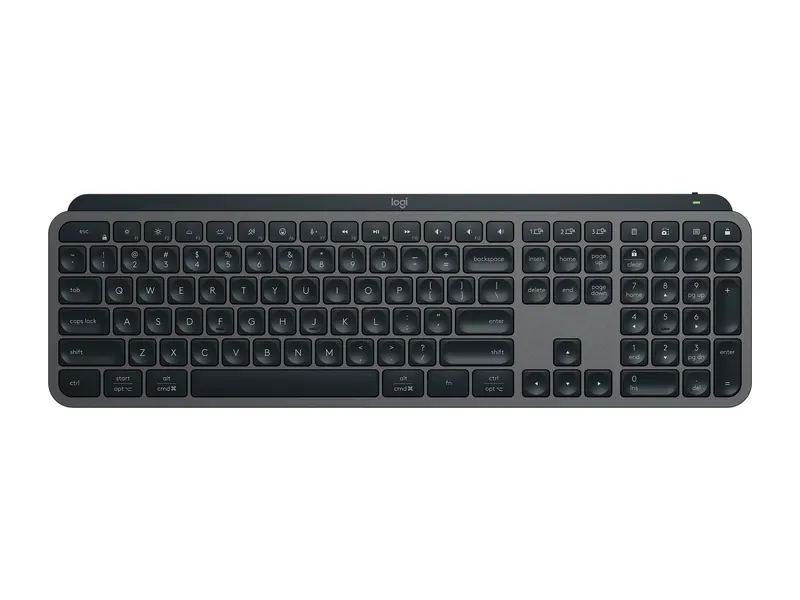
The most comfortable keyboard here for long typing sessions. Each key is dished to cradle your fingertip, the backlight wakes as your hands approach, and Smart Actions in Logi Options+ can run several steps with one key. It is the best keyboard for laptop work if your budget allows.
- Connection
- Bluetooth, USB-C charging
- Devices
- Up to 3 computers
- Keys
- Low-profile scissor, spherically dished
- Backlight
- Smart backlighting
- Battery
- Up to 10 days with backlight, 5 months without
- Works with
- Windows, macOS, Linux, ChromeOS
All 10 keyboards compared

Use the chart to shortlist the best keyboard for laptop use in your budget, then read the full notes above. Every pick works with a laptop or a desktop PC.
Best keyboard for laptop by budget: under ₹300, ₹500, ₹1,000 and ₹2,000
Our buying guides don't list exact prices, because they change daily. Below are the price brackets each pick sat in when we checked on 31 October 2026. Always confirm the live listing before you buy.
Best keyboard for laptop under ₹300
Only the Zebronics K65 fits this bracket among our picks. It is a full-size wired keyboard with a ₹ key and tilt stand; do not expect wireless or backlighting at this price.
Best keyboard for laptop under ₹500
The Zebronics K65 is again the only pick inside ₹500. The closest step up is the Dell KB216, which sat just above ₹500 and has noticeably better keys and spill resistance. If you can stretch slightly, it is the better long-term buy.
Best keyboard for laptop under ₹1,000
This is where choice opens up: the Dell KB216 for a wired office desk, the Portronics Bubble 3.0 for wireless and Bluetooth, the Logitech MK215 if you also need a mouse, and the HP K500F for a backlit gaming keyboard.
Best keyboard for laptop under ₹2,000
The HP 350 Compact is the best compact Bluetooth option, and the EvoFox Katana X2 TKL is a real mechanical keyboard with hot-swappable switches. Above ₹2,000, the Logitech Pebble Keys 2 K380s, AULA F75 and Logitech MX Keys S add premium build, multi-device switching and better typing feel.
Best keyboard for typing all day
The best keyboard for laptop typing is quiet, stable and comfortable for hours. Writers, students with long assignments and anyone who answers emails all day should prioritise key feel and a comfortable angle over features.
- Logitech MX Keys S: dished, backlit keys with quiet, precise travel. The best keyboard for laptop typing in this list.
- Logitech Pebble Keys 2 K380s: quiet round keys and a slim profile at a lower price, good for writers who move around.
- Dell KB216: low-profile keys that feel like a good laptop keyboard, at a budget price.
Keep your wrists straight: lay the keyboard flat or use a slight tilt, and place the laptop on a stand so the screen sits at eye level.
Best keyboard for coding and programming
The best keyboard for laptop coding needs accurate symbols, comfortable modifier keys and a layout that keeps the mouse close.
- Logitech MX Keys S: precise scissor keys, customisable shortcuts and three-device switching between a work laptop and a personal machine.
- AULA F75: a 75% layout keeps arrows and function keys while saving space; the smooth linear switches are great for long sessions.
- EvoFox Katana X2 TKL: the budget route to a mechanical keyboard for coding, with a compact TKL layout. Choose it if a clicky sound does not bother anyone nearby.
Coding on a laptop also benefits from a faster processor and more memory; see our laptop buying guide for India for what to check.
Best keyboard for gaming on a laptop
The best keyboard for laptop gaming solves two problems. Laptop keyboards often limit how many keys register at once and run hot under your hands during play. An external gaming keyboard fixes both.
- HP K500F: budget backlit board with 26 anti-ghosting keys.
- EvoFox Katana X2 TKL: mechanical switches and a TKL layout that leaves room for wide mouse swipes.
- AULA F75: wired for zero-lag play, or wireless when you want a clean desk.
Pair it with a good mouse from our best mouse for laptop guide, and see our gaming laptops under ₹60,000 if you are still choosing the machine.
Best keyboard for office and work from home
For the best keyboard for laptop work at a desk, reliability, quiet keys and a number pad matter most.
- Dell KB216: the classic office keyboard, spill resistant and quiet.
- Logitech MK215: keyboard and mouse on one receiver, a tidy upgrade for a home-office laptop.
- Portronics Bubble 3.0: switches between your laptop and phone, handy for answering chats without picking up the phone.
The Logitech MX Keys S is the premium choice if you work long hours.
Best keyboard for students and beginners
The best keyboard for laptop students is affordable, light and easy to carry. Students need something affordable, light and easy to carry between hostel, home and library.
- Portronics Bubble 3.0: wireless, rechargeable and multi-device on a student budget.
- HP 350 Compact: compact, quiet and light enough for a backpack.
- Zebronics K65: the cheapest way to get a full-size keyboard at a hostel desk.
Still picking a laptop for college? Start with our best laptops for students in India.
Best keyboard for Mac and MacBook
The best keyboard for laptops from Apple is usually a Bluetooth one, because MacBooks have only USB-C ports, so Bluetooth keyboards that support macOS are the easiest fit.
- Logitech MX Keys S: works with macOS and switches between a MacBook, an iPad and a Windows PC.
- Logitech Pebble Keys 2 K380s: slim, quiet and popular with Mac and iPad owners.
- HP 350 Compact: auto-detects macOS and remaps keys to match.
Wired and receiver keyboards also work with a MacBook through a USB-C adapter, but you lose the tidy wireless setup.
Small and portable keyboards
For travel, the best keyboard for laptop bags is a compact Bluetooth keyboard without a number pad, as it is the lightest choice. The HP 350 Compact at 340 g and the slim Logitech Pebble Keys 2 K380s both fit in a laptop sleeve. The AULA F75 is compact in footprint but heavy, so treat it as a desk keyboard.
Backlit keyboards for typing in the dark
A backlight makes the best keyboard for laptop use at night even better. It helps if you work late or in a dim hostel room. Among our picks, the Logitech MX Keys S has smart white backlighting that adjusts to the room, the HP K500F offers single or mixed colours, the EvoFox Katana X2 TKL has 11 lighting modes, and the AULA F75 has full RGB. The budget wired, Bluetooth travel and combo picks have no backlight.
Is a mechanical keyboard worth it for a laptop?
A mechanical keyboard lasts longer, feels more precise and can be tuned with new switches and keycaps. The trade-offs are noise, weight and price. If you type or game for hours at one desk, a mechanical board can be the best keyboard for laptop setups; if you carry your keyboard daily, a scissor-switch Bluetooth keyboard is more practical.
The EvoFox Katana X2 TKL is the budget entry point, while the AULA F75 is a big step up in sound and feel. A dedicated guide to mechanical keyboards under ₹3,000 is coming soon.
Wired, wireless, Bluetooth or USB: which to buy?
The best keyboard for laptop connections depends on your ports. Choose wired USB (Zebronics K65, Dell KB216, HP K500F, EvoFox Katana X2 TKL) for the lowest price and zero charging. Choose a 2.4GHz receiver (Logitech MK215, Portronics Bubble 3.0) for a simple, stable wireless connection. Choose Bluetooth (HP 350 Compact, Logitech Pebble Keys 2 K380s, Logitech MX Keys S) if your laptop is short on ports or you switch between devices. The AULA F75 does all three.
For more on how keyboards work, the computer keyboard article on Wikipedia covers switch types and layouts in depth.
Setting up an external keyboard with your laptop
Even the best keyboard for laptop use helps only if your desk is set up well. Raise the laptop on a stand so the top of the screen sits near eye level, then place the keyboard flat in front of you with the mouse beside it. Keep elbows at roughly 90 degrees and wrists straight. For Bluetooth, hold the pairing key until the light blinks and select the keyboard in your laptop's Bluetooth settings. For a receiver, just plug it in. If keys lag, move the receiver away from crowded USB 3.0 ports or closer to the keyboard.
More keyboard guides
We are expanding this section with focused guides for each type of keyboard:
- Best wireless keyboard (coming soon)
- Best keyboard and mouse combo (coming soon)
- Best mechanical keyboard under ₹3,000 (coming soon)
Looking for a mouse to match? See our best mouse for laptop guide and best wireless mouse picks. Still choosing the laptop itself? Our laptop buying guide for India explains what to check, and the laptop guides by budget list verified picks at every price.
Frequently asked questions
What is the best keyboard for laptop use overall?
For most people, the Logitech MX Keys S if budget allows, or the Portronics Bubble 3.0 for a low-cost wireless keyboard. For a fixed desk on a tight budget, the Dell KB216 is a safe wired choice.
Can I use any keyboard with a laptop?
Yes. Any USB or Bluetooth keyboard works with a Windows laptop, and most also work with macOS, ChromeOS and Linux. USB-C-only laptops need an adapter for USB-A keyboards and receivers.
Is a wireless keyboard good for gaming?
A good 2.4GHz or wired connection is best for gaming. Tri-mode keyboards like the AULA F75 let you game wired or over a low-lag receiver and use Bluetooth for work.
Which keyboard is best for typing?
Low-profile scissor-switch keyboards like the Logitech MX Keys S feel closest to a premium laptop keyboard, while linear mechanical keyboards like the AULA F75 suit people who prefer deeper key travel.
Should I buy a keyboard with a number pad?
Choose a full-size keyboard if you enter numbers often. If you mainly write or game, a tenkeyless or 75% keyboard saves space and keeps your mouse closer.
Does an external keyboard help posture?
Yes. With an external keyboard you can raise the laptop screen to eye level on a stand while your hands stay low, which reduces neck and shoulder strain.
The final word
The best keyboard for laptop users depends on how you work: the Logitech MX Keys S for comfortable all-day typing, the Portronics Bubble 3.0 for budget wireless, the HP 350 Compact for travel, the AULA F75 for mechanical typing and gaming, and the Dell KB216 for a dependable office desk. On the tightest budget, the Zebronics K65 does the basics. See the rest of our laptop accessories for the next upgrade.
Last updated on . Specifications, stock and prices change frequently. Always check the live listing before you buy.
More buying guides

Best laptops for students
Need the best laptop for students in India? 8 verified picks for CSE, engineering, commerce, design and school, matched to your course and your budget.
Read guide →
Best laptops under ₹50,000
Looking for the best laptop under 50000 in India? 7 picks for students, home and office, compared on verified specs with honest pros, cons and buying tips.
Read guide →
Best gaming laptops under ₹60,000
Best gaming laptop under 60000 in India? 4 honest picks for eSports and light gaming, the truth about dedicated GPUs at this budget, and verified specs.
Read guide →
Best laptops under ₹40,000
Best laptop under 40000 in India: 6 Ryzen 3, Chromebook and Primebook picks for students and home use, compared on verified specs with honest trade-offs.
Read guide →