7 Best Wireless Mouse in India (November 2026)


The best wireless mouse is the one that disappears into your routine: it wakes the moment you touch it, lasts months between batteries or charges, and leaves your laptop's few ports free for things that need them. Cutting the cable is the easy part. Choosing between a budget receiver mouse, a silent Bluetooth model and a premium productivity flagship is where most buyers get stuck.
We shortlisted seven wireless mice that cover every budget and every common reason people search for one, from a pocket-sized student mouse to a low-lag gaming mouse. Each was confirmed in stock in India on 30 October 2026, and each earns its place for a specific job. If you want wired, ergonomic and other kinds of mice too, start with our wider guide to the best mouse for laptop users.
On this page
- The 7 best wireless mouse picks, cheapest first
- Best wireless mouse comparison
- How to choose the best wireless mouse
- Best wireless mouse for laptop users
- Best wireless mouse for office work and work from home
- Best wireless mouse for gaming
- Best wireless mouse for MacBook and Mac
- Best wireless mouse for video editing
- Best wireless mouse by budget
- Best wireless mouse with Bluetooth, dual connectivity or no dongle
- Best wireless mouse with a Type-C receiver
- Best wireless mouse with rechargeable battery and Type-C charging
- Best wireless mouse with silent click
- Best wireless mouse with long battery life
- Best wireless mouse with side buttons
- Best wireless mouse with RGB light
- Best wireless mouse with high DPI
- Best wireless mouse that is ergonomic or vertical
- Best wireless mouse for small hands, large hands and travel
- Other wireless mouse features people search for
- Setting up a wireless mouse and fixing lag
- FAQs
- Final word
- More buying guides
The 7 best wireless mouse picks, cheapest first
The list runs from the cheapest to the most expensive. Read the award line on each card: it tells you who that particular best wireless mouse pick is for. Use-case and feature sections further down then match these seven mice to specific needs.
Portronics Toad 23 Wireless Mouse
The simplest way to get a cable-free laptop setup. It plugs in and works with no software, the compact body slips into a sleeve pocket, and it suits either hand. The plastic feels basic and the clicks are not silent, but at this price it is the best wireless mouse for students and anyone who needs a dependable spare.
- Connection
- 2.4GHz, USB nano receiver
- Sensor
- Optical, adjustable DPI
- Buttons
- 3, with click wheel
- Shape
- Ambidextrous, compact
- Weight
- 75 g (as listed)
Portronics Toad One Bluetooth Mouse
A lot of features for a small outlay: two ways to connect, three device slots, Type-C charging, side buttons and colour lighting. The rated battery life is measured in days, not months, so it suits people who are happy to plug in once a week. Over ten thousand buyer ratings back up its reliability.
- Connection
- Bluetooth 5.3 + 2.4GHz receiver
- Devices
- Up to 3
- Battery
- Rechargeable via USB Type-C
- Buttons
- 6, including side buttons
- Extras
- RGB lighting, adjustable DPI
Logitech M240 Silent Bluetooth Mouse
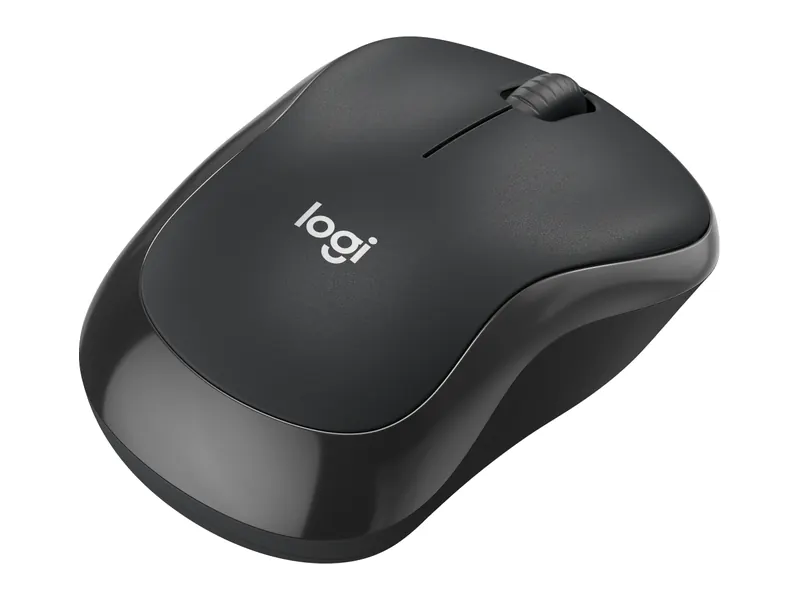
Bluetooth means no receiver to lose and no USB port used, which matters on thin laptops and MacBooks with only USB-C. The clicks are close to silent and the slim, symmetrical shape travels well. It has no side buttons, so heavy multitaskers should look further down the list.
- Connection
- Bluetooth only, no receiver
- Clicks
- About 90% quieter (as claimed)
- Sensor
- 400 to 4,000 DPI
- Battery
- Up to 18 months on 1 x AA (as claimed)
- Works with
- Windows, macOS, ChromeOS, Linux, iPadOS, Android
Logitech M331 Silent Plus Wireless Mouse
A comfortable, right-handed shape with rubber grips, almost silent clicks and battery life that runs well past a year. It is the safest choice for shared homes, libraries and open offices. Its fixed 1,000 DPI suits Full HD screens but feels slow on large high-resolution monitors.
- Connection
- 2.4GHz, USB nano receiver
- Clicks
- SilentTouch, over 90% quieter (as claimed)
- Sensor
- 1,000 DPI optical
- Battery
- 1 x AA, rated 18 to 24 months
- Shape
- Right-handed, contoured
Logitech Signature M650 Wireless Mouse
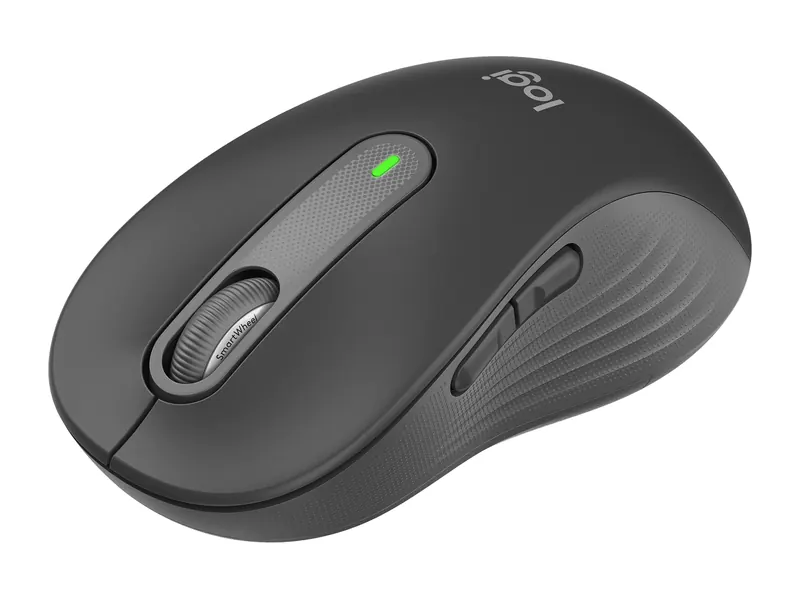
The upgrade most home workers feel immediately: two side buttons for back, forward or copy-paste, a scroll wheel that spins freely through long pages, and silent clicks. You can connect by Bluetooth or the included receiver. This version suits small and medium hands; people with large hands should try it in a store first.
- Connection
- Bluetooth LE or Logi Bolt receiver
- Buttons
- 5, with customisable side buttons
- Scrolling
- SmartWheel: line-by-line or fast free-spin
- Battery
- Up to 24 months on 1 x AA (as claimed)
- Fits
- Small to medium hands
Logitech G304 Lightspeed Wireless Gaming Mouse
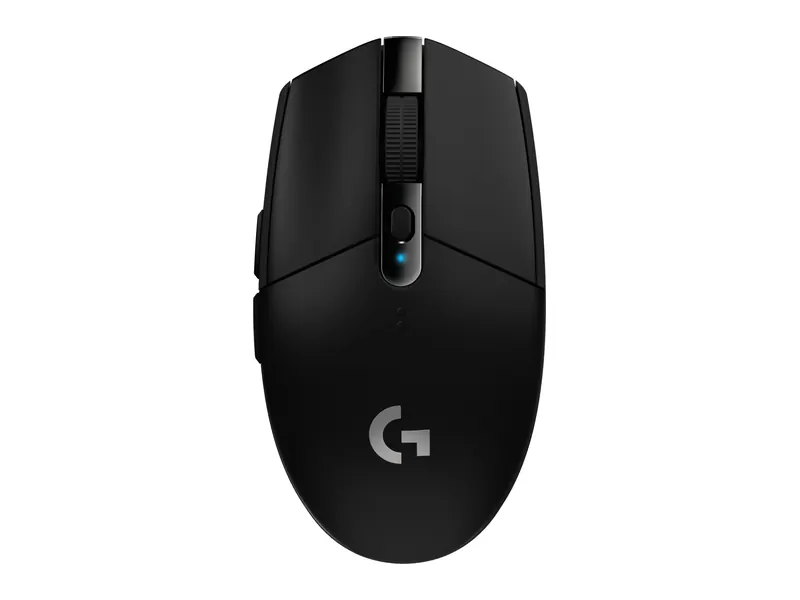
A proper gaming sensor and a low-lag receiver in a light, compact body. It plays eSports titles such as Valorant and CS2 without the delay some Bluetooth mice show, and its six programmable buttons double as shortcuts for work. Battery life is shorter than office mice, so keep a spare AA in your bag.
- Connection
- Lightspeed 2.4GHz, 1 ms report rate
- Sensor
- HERO, up to 12,000 DPI
- Buttons
- 6, programmable, on-board memory
- Battery
- Up to 250 hours on 1 x AA (as claimed)
- Weight
- About 99 g
Logitech MX Master 3S Bluetooth Edition
The best wireless mouse money buys for long workdays. MagSpeed scrolling, a horizontal thumb wheel for timelines and spreadsheets, quiet clicks and a sculpted right-handed shape make it a favourite of editors and developers. It is large and heavy, and this Bluetooth edition ships without a charging cable or receiver, so check you have a USB-C cable.
- Connection
- Bluetooth only, up to 3 devices
- Sensor
- 8,000 DPI, tracks on glass
- Buttons
- 7, including thumb wheel and gesture button
- Battery
- Rechargeable via USB-C (cable not included)
- Weight
- About 141 g
Best wireless mouse comparison

The chart above lines up the seven picks. In short, the best wireless mouse for you depends on one deciding factor:
- Lowest cost: Portronics Toad 23.
- Rechargeable and feature-packed on a budget: Portronics Toad One.
- No receiver at all: Logitech M240 Silent or Logitech MX Master 3S Bluetooth Edition.
- Quiet clicks and long battery: Logitech M331 Silent Plus or Logitech Signature M650.
- Gaming: Logitech G304 Lightspeed.
- Heavy productivity and editing: Logitech MX Master 3S Bluetooth Edition.
How to choose the best wireless mouse

Five checks separate a mouse you will love from one that ends up in a drawer.
1. Receiver, Bluetooth or both
A 2.4GHz receiver connects instantly and rarely lags, but it occupies a USB-A port and can be lost. Bluetooth needs no receiver and works with tablets and phones too, though it can take a second to wake. Dual-mode mice give you both. Our mouse hub explains wired options if you do not need wireless at all.
2. AA battery or rechargeable
A single AA cell often lasts a year or more in an office mouse and can be replaced anywhere in minutes. Rechargeable mice skip batteries entirely but need regular charging; check the rated life before you buy, because it ranges from days to months.
3. Size and hand
Small mice travel well but can cramp large hands over a long day. Right-handed sculpted mice are the most comfortable at a desk; left-handers need an ambidextrous design.
4. Click noise
Silent switches matter more than most people expect in shared rooms, libraries and on late-night calls.
5. Buttons and software
Side buttons and companion software turn a mouse into a shortcut tool. Logitech's free Logi Options+ app lets you remap buttons on the M650 and MX Master 3S.
Best wireless mouse for laptop users
Most people searching for a wireless mouse use it with a laptop, so port count and portability matter as much as comfort. These three picks suit everyday laptop use:
- Logitech M240 Silent: Bluetooth, so it uses no port at all. The best wireless mouse for laptop owners with only USB-C ports.
- Portronics Toad 23: cheap, light and easy to carry, with a receiver that stays plugged in.
- Logitech M331 Silent Plus: more comfortable for long sessions, with very quiet clicks.
People often look for a wireless mouse for an HP, Dell or Lenovo laptop specifically. There is no need to match brands: every mouse here works with any Windows laptop, and the Bluetooth models also pair with Chromebooks and MacBooks. Still choosing the laptop itself? Our best laptops for students in India guide lists port layouts for each pick.
Best wireless mouse for office work and work from home
Office work rewards quiet clicks, long battery life and buttons that save time. Our three picks for this use case:
- Logitech Signature M650: side buttons, silent clicks and SmartWheel scrolling for documents and long web pages.
- Logitech M331 Silent Plus: a lower-cost silent option for anyone who just needs comfort and reliability.
- Logitech MX Master 3S Bluetooth Edition: the step up for people who live in spreadsheets, with a horizontal thumb wheel and three device slots.
If you work from home on a laptop all day, pair the mouse with a stand and an external keyboard; our laptop accessories guide covers both.
Best wireless mouse for gaming
Gaming needs low latency and an accurate sensor, which rules out most office mice. Two of our picks fit:
- Logitech G304 Lightspeed: Lightspeed receiver with a 1 ms report rate and a 12,000 DPI HERO sensor. The best wireless mouse for gaming on a laptop at a sensible price, and a popular choice for Valorant.
- Portronics Toad One: fine for casual games, with side buttons and RGB lighting, but its sensor and Bluetooth mode are not built for competitive play.
Only one of our seven is a dedicated gaming mouse, so for more choice, including wired gaming mice, see the gaming section of our best mouse for laptop guide. Pairing it with a new machine? Our best gaming laptops under ₹70,000 are a good match.
Best wireless mouse for MacBook and Mac
MacBook Air and MacBook Pro models have only USB-C ports, so a Bluetooth mouse is the cleanest choice. These three pair directly with macOS:
- Logitech MX Master 3S Bluetooth Edition: the favourite for Mac users who want gestures and fast scrolling; it is designed to work with macOS and Logi Options+.
- Logitech M240 Silent: a quiet, compact Bluetooth mouse that pairs with a MacBook and an iPad.
- Logitech Signature M650: Bluetooth plus side buttons, which macOS can map to back and forward in Safari and Finder.
Receiver mice such as the M331 and G304 also work with a Mac, but you will need a USB-C to USB-A adapter.
Best wireless mouse for video editing
Editing timelines and photo work benefit from precise tracking, extra buttons and fast horizontal scrolling. Our picks:
- Logitech MX Master 3S Bluetooth Edition: the thumb wheel scrubs timelines sideways, and buttons can be set per app in Logi Options+.
- Logitech G304 Lightspeed: programmable buttons and a precise sensor at less than half the price.
- Logitech Signature M650: a budget-friendly option with side buttons for undo and redo.
A capable laptop matters more than the mouse for editing, so check processor and memory first; our laptop buying guide for India explains what to look for.
Best wireless mouse by budget

Prices move daily, so these bands reflect what we saw on 30 October 2026. Always confirm the live price before you buy.
Best wireless mouse under ₹200 to ₹400
The Portronics Toad 23 was selling well under ₹300 when we checked, making it the only pick in this band. Mice below ₹200 do exist, but none we found had the track record we wanted, so the Toad 23 is the closest option.
Best wireless mouse under ₹500
The Portronics Toad 23 again. If you can stretch a few hundred rupees more, the Portronics Toad One adds Bluetooth, charging and side buttons.
Best wireless mouse under ₹1,000
Choose the Portronics Toad One for features or the Logitech M240 Silent for silent clicks and Logitech's long battery life.
Best wireless mouse under ₹1,500 and ₹2,000
The Logitech M331 Silent Plus is our pick. None of the other six sits in the ₹1.5k–2k band; the M650 is the next step up, in the ₹2k class.
Best wireless mouse under ₹3,000
The Logitech Signature M650 for work or the Logitech G304 Lightspeed for gaming. For premium use beyond this budget, the Logitech MX Master 3S Bluetooth Edition is the one to buy.
Best wireless mouse with Bluetooth, dual connectivity or no dongle
If you search for a wireless mouse without a dongle, without USB or with no receiver, you want Bluetooth. Our options:
- Bluetooth only (no dongle): Logitech M240 Silent and Logitech MX Master 3S Bluetooth Edition.
- Dual connectivity (Bluetooth plus receiver): Portronics Toad One and Logitech Signature M650.
- Multi-device switching: Portronics Toad One and Logitech MX Master 3S Bluetooth Edition each remember three devices.
Bluetooth Low Energy, the standard these mice use, is designed to sip power; its Wikipedia entry explains how it differs from classic Bluetooth.
Best wireless mouse with a Type-C receiver
None of our seven picks ships with a USB-C receiver, as far as the listings show; the receivers that come with the Toad 23, Toad One, M331, M650 and G304 are USB-A. For a USB-C-only laptop, the closest options are the Bluetooth Logitech M240 Silent and Logitech MX Master 3S Bluetooth Edition, which need no receiver at all. Alternatively, a small USB-C to USB-A adapter lets any receiver mouse work.
Best wireless mouse with rechargeable battery and Type-C charging
Two of our picks are rechargeable, both through USB Type-C:
- Portronics Toad One: rated for about nine days per charge, so plan on a weekly top-up.
- Logitech MX Master 3S Bluetooth Edition: Logitech rates it at up to 70 days per full charge, and a quick one-minute charge gives several hours of use. The Bluetooth edition does not include a cable.
If you want the longest life with no charging at all, an AA mouse such as the Logitech Signature M650 is rated to last up to two years.
Best wireless mouse with silent click
Four of our picks have quiet switches: Logitech M240 Silent, Logitech M331 Silent Plus, Logitech Signature M650 and Logitech MX Master 3S Bluetooth Edition. Logitech claims around 90% less click noise for each, and in practice they are hard to hear across a room. The Toad 23, Toad One and G304 have normal, audible clicks.
Best wireless mouse with long battery life
For a mouse you can forget about, pick an AA model. The Logitech Signature M650 is rated for up to 24 months, the Logitech M331 Silent Plus for 18 to 24 months and the Logitech M240 Silent for up to 18 months on a single AA cell. The Logitech G304 Lightspeed is rated for 250 hours of continuous gaming, which usually means several months of mixed use.
Best wireless mouse with side buttons
Side buttons handle back and forward in browsers and can be remapped to shortcuts. You will find them on the Logitech Signature M650 (two), Logitech G304 Lightspeed (programmable), Logitech MX Master 3S Bluetooth Edition (plus a gesture button) and Portronics Toad One (on a budget). The Toad 23, M240 and M331 have no side buttons.
Best wireless mouse with RGB light
Only one pick has lighting: the Portronics Toad One, which cycles through seven colours. The G304 deliberately skips RGB to save battery. If lighting is a priority, the Toad One is the closest option on our list; wired RGB gaming mice are covered in our mouse hub.
Best wireless mouse with high DPI
High DPI helps on large and high-resolution screens. The Logitech G304 Lightspeed reaches 12,000 DPI and the Logitech MX Master 3S Bluetooth Edition 8,000 DPI; the Logitech M240 Silent adjusts from 400 to 4,000 DPI. Most people are comfortable between 1,000 and 1,600 DPI on a Full HD laptop, so DPI alone should not decide the best wireless mouse for you.
Best wireless mouse that is ergonomic or vertical
None of our seven is a vertical mouse. The most ergonomic pick here is the Logitech MX Master 3S Bluetooth Edition, whose sculpted shape supports the whole hand. If wrist pain is the problem, a true vertical design such as the Logitech Lift, which we recommend in our mouse hub, is the better answer.
Best wireless mouse for small hands, large hands and travel
- Small hands and travel: Portronics Toad 23 (about 75 g) and Logitech M240 Silent are compact and slim.
- Medium hands: Logitech Signature M650 and Logitech G304 Lightspeed.
- Large hands: Logitech MX Master 3S Bluetooth Edition and Logitech M331 Silent Plus fill the palm better. Logitech also sells a larger M650 L, which we have not listed here.
A lightweight mouse also makes sense for travel; pair it with a padded sleeve, as our accessories guide suggests.
Other wireless mouse features people search for
Low latency and no lag
The Logitech G304 Lightspeed with its Lightspeed receiver is the only pick built for zero perceptible lag. Office mice feel instant for normal work.
Works on any surface
The Logitech MX Master 3S Bluetooth Edition tracks even on glass. Other optical mice need a non-reflective surface or a cheap cloth mouse pad.
Linux and ChromeOS
The Logitech M240 Silent and Logitech Signature M650 list Linux and ChromeOS support, and simple receiver mice such as the Toad 23 work without drivers.
Transparent, honeycomb and heavy designs
None of our picks is transparent or uses a honeycomb shell, and none has adjustable weights. We chose on reliability and comfort rather than looks; the closest to a heavier, planted feel is the Logitech MX Master 3S Bluetooth Edition.
Wireless keyboard and mouse combos
A combo is cheaper than buying both separately. We cover a budget combo, along with wireless, Bluetooth and mechanical keyboards, in our best keyboard for laptop guide.
Setting up a wireless mouse and fixing lag
For receiver mice, plug the receiver into a port facing the mouse and switch the mouse on. For Bluetooth, hold the pairing button until the light blinks, then select the mouse in your laptop's Bluetooth settings. If the pointer stutters, move the receiver to a different port or use a short extension cable, keep it away from crowded USB 3.0 ports and switch off the mouse when you pack it so it does not wake in your bag.
Frequently asked questions
Which is the best wireless mouse in India overall?
For most people, the Logitech M331 Silent Plus: comfortable, quiet and reliable, with a battery that lasts well over a year. Choose the Logitech M240 Silent if you want Bluetooth with no receiver.
Which brand makes the best wireless mouse?
Logitech leads for reliability, battery life and software, which is why five of our seven picks are Logitech. Portronics offers the best value at the budget end.
Is Bluetooth or a 2.4GHz receiver better?
A receiver connects instantly and has lower lag, which suits gaming. Bluetooth frees a USB port and pairs with tablets and phones. Dual-mode mice give you both.
What is the best wireless mouse under ₹1,000?
The Portronics Toad One for features such as charging, side buttons and three device slots, or the Logitech M240 Silent for quiet clicks and long battery life.
Is a wireless mouse good for gaming?
Yes, if it uses a low-latency receiver. The Logitech G304 Lightspeed feels as responsive as a wired mouse in most games. Avoid Bluetooth mode for competitive play.
How long does a wireless mouse battery last?
AA-powered office mice are often rated for 18 to 24 months. Rechargeable mice range from about nine days (Portronics Toad One) to around 70 days (MX Master 3S) per charge.
Will a wireless mouse work with my HP, Dell or Lenovo laptop?
Yes. Every mouse here works with any Windows laptop regardless of brand. Bluetooth models also work with MacBooks, Chromebooks and tablets.
The final word
The best wireless mouse for most buyers is the Logitech M331 Silent Plus. On a tight budget, the Portronics Toad 23 does the basics well, and the Portronics Toad One adds charging and Bluetooth for little more. Pick the Logitech M240 Silent if you need no dongle, the Signature M650 for home working, the G304 for gaming and the MX Master 3S if a mouse is a daily work tool. For wired, ergonomic and gaming alternatives, return to our best mouse for laptop guide.
Last updated on . Specifications, stock and prices change frequently. Always check the live listing before you buy.
More buying guides

Best laptops for students
Need the best laptop for students in India? 8 verified picks for CSE, engineering, commerce, design and school, matched to your course and your budget.
Read guide →
Best laptops under ₹25,000
Best laptop under 25000 in India? 5 honest picks: an 8GB Primebook, a Full HD Chromebook, a 2-in-1 and two budget options, with verified specs and clear limits.
Read guide →
Best laptops under ₹50,000
Looking for the best laptop under 50000 in India? 7 picks for students, home and office, compared on verified specs with honest pros, cons and buying tips.
Read guide →
Best gaming laptops under ₹70,000
Best gaming laptop under 70000 in India: 5 verified in-stock picks with Radeon 780M, Intel Arc and Radeon 660M graphics, what each can play, and upgrade tips.
Read guide →