4 Best Gaming Laptops Under ₹55,000 in India (November 2026)


The best gaming laptop under 55000 is the first budget in India where a real dedicated graphics card becomes possible, and that changes everything about what you should buy. At ₹50,000 you are limited to graphics built into the processor. Here, an NVIDIA RTX 3050 fits, and a laptop GPU is in a different league: it has its own 4GB or 6GB of video memory, its own power budget of 65W to 95W, and it runs games at settings no integrated chip can reach.
We checked Indian listings in November 2026 and compared every candidate on the parts that decide frame rates: which RTX 3050 variant it uses and at what wattage, whether memory runs in dual channel, what the screen refresh rate is, and how the cooling is built. Four laptops were in stock and stood up to that check. The single most important thing we found is that the 6GB version of the RTX 3050 is worth chasing over the 4GB one at this price, and two of our four picks have it.
On this page
Best gaming laptop under 55000: quick picks
Here is our shortlist of the best gaming laptops under 55000 at a glance. Tap a name to jump to its full review.
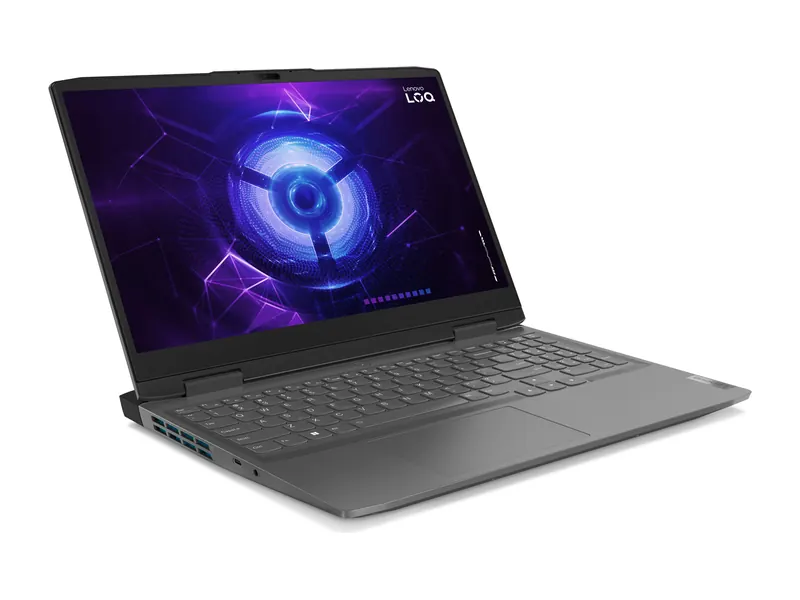 Best overall
Lenovo LOQ 15 (Core i5-13450HX, RTX 3050 6GB, 16GB/512GB)
Core i5-13450HX (10 cores, 16 threads), RTX 3050 6GB at 95W, 16GB DDR5-4800, 512GB PCIe 4.0 SSD, 15.6-inch FHD IPS at 144Hz with 100% sRGB and G-Sync, 60Wh battery, 2.38 kg.
Check price on Amazon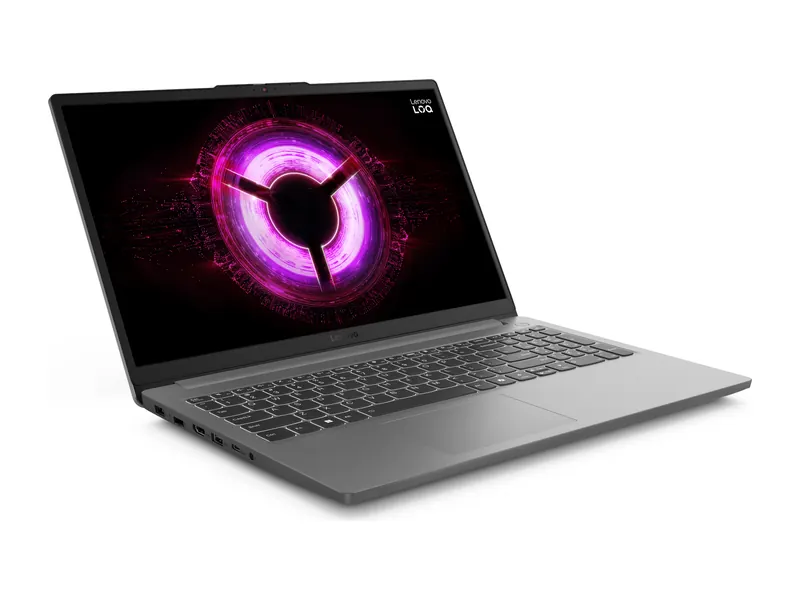 Best value
Lenovo LOQ Essential (Ryzen 5 7535HS, RTX 3050 6GB)
Ryzen 5 7535HS (6 cores, 12 threads), RTX 3050 6GB at 65W, 16GB DDR5-4800, 512GB PCIe 4.0 SSD with a second M.2 slot, 15.6-inch FHD IPS at 144Hz with 100% sRGB, 57.5Wh battery, 1.8 kg.
Check price on Amazon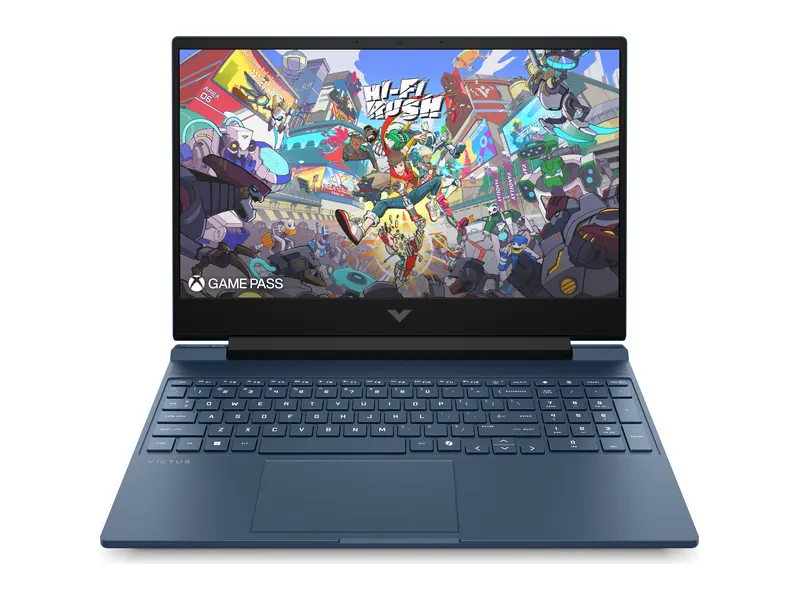 Best battery life
HP Victus 15 (Ryzen 7 7445HS, RTX 3050 6GB, 16GB/512GB)
Ryzen 7 7445HS (6 cores, 12 threads), RTX 3050 6GB, 16GB DDR5, 512GB SSD, 15.6-inch FHD IPS at 144Hz with 300 nits, 70Wh battery, 2.29 kg.
Check price on Amazon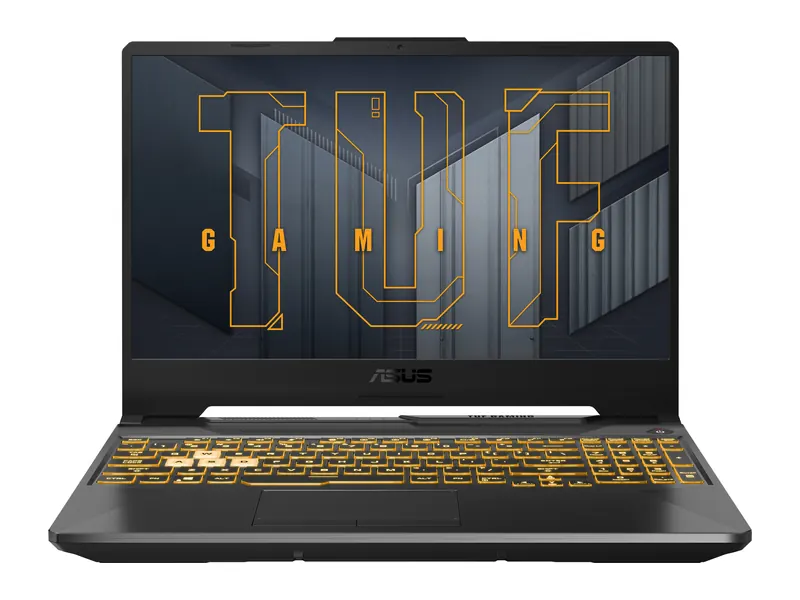 Best build quality
ASUS TUF Gaming A15 (Ryzen 7 7445HS, RTX 3050 4GB)
Ryzen 7 7445HS (6 cores, 12 threads), RTX 3050 4GB at 75W, 16GB DDR5 upgradeable to 64GB, 512GB PCIe 4.0 SSD, 15.6-inch FHD at 144Hz and 250 nits, 48Wh battery, 2.3 kg.
Check price on AmazonBest gaming laptops under 55000 compared
This table puts the key specifications of the best gaming laptops under 55000 side by side. Full specifications, pros and cons are in each review below.
All four use a 144Hz 1080p panel, so the real differences are the graphics card variant, its wattage, and the battery.
| Laptop | Best for | Processor | Graphics | RAM · SSD | Display | Weight | Price |
|---|---|---|---|---|---|---|---|
| 1Lenovo LOQ 15Core i5-13450HX | Best overall | Core i5-13450HX | RTX 3050 6GB · 95W | 16GB · 512GB | 15.6-inch FHD IPS, 144Hz | 2.38 kg | Check price |
| 2Lenovo LOQ EssentialRyzen 5 7535HS | Best value | Ryzen 5 7535HS | RTX 3050 6GB · 65W | 16GB · 512GB | 15.6" FHD IPS, 144Hz | 1.8 kg | Check price |
| 3HP Victus 15Ryzen 7 7445HS | Best battery life | Ryzen 7 7445HS | RTX 3050 6GB | 16GB · 512GB | 15.6" FHD IPS, 144Hz | 2.29 kg | Check price |
| 4ASUS TUF Gaming A15Ryzen 7 7445HS | Best build quality | Ryzen 7 7445HS | RTX 3050 4GB · 75W | 16GB · 512GB | 15.6" FHD, 144Hz | 2.3 kg | Check price |


Best gaming laptop under 55000: detailed reviews
Each review explains who the laptop suits, what it does well and where it falls short, so you can pick the best gaming laptop under 55000 for your needs.
Lenovo LOQ 15 (Core i5-13450HX, RTX 3050 6GB, 16GB/512GB)
Best for: Buyers who want the most GPU power and the best screen the budget allows
Ranked #1 of 4 on our list of the best gaming laptops under 55000.
The Lenovo LOQ 15 is the best gaming laptop under 55000 because it is the only pick here that gives you all three things that matter at once: the 6GB RTX 3050 running at a full 95W, a 144Hz screen with 100% sRGB coverage, and an HX-series processor with ten cores. The wattage figure is the detail most listings hide. The same RTX 3050 can be sold at 65W or at 95W, and the higher figure is worth several frames per second in every game.
The 100% sRGB screen matters beyond games: it makes the LOQ usable for photo editing and video work, which most budget gaming panels cannot manage. G-Sync keeps fast motion smooth. The Core i5-13450HX has six performance cores and four efficiency cores, so streaming while you play is realistic. The trade-off is weight at 2.38 kg and a 60Wh battery that will not last a full day away from a socket. Memory is a single 16GB stick with a free slot, so you can add a second one later.
- Processor
- Intel Core i5-13450HX (10 cores/16 threads, up to 4.6GHz)
- Graphics
- NVIDIA GeForce RTX 3050 6GB GDDR6, 95W TGP
- Memory
- 16GB DDR5-4800 (1x 16GB, up to 32GB)
- Storage
- 512GB M.2 2242 PCIe 4.0 NVMe SSD
- Display
- 15.6-inch FHD (1920×1080) IPS, 144Hz, 300 nits, 100% sRGB, G-Sync
- Weight
- 2.38 kg
- Battery
- 60 Wh
- Software
- Windows 11 Home, Office Home 2024
- Ports
- USB-C, 3x USB-A, HDMI, RJ-45, audio jack
- Also
- MUX switch with Advanced Optimus, Wi-Fi 6, LA1 AI chip
What we like
- RTX 3050 6GB at the full 95W TGP
- 144Hz 100% sRGB screen with G-Sync
- 10-core HX-series processor
- DDR5 memory with a free slot for upgrades
Watch out for
- 2.38 kg is heavy for carrying daily
- 60Wh battery drains quickly in games
Lenovo LOQ Essential (Ryzen 5 7535HS, RTX 3050 6GB)
Best for: Students who want RTX gaming and still need to carry the laptop to class
Ranked #2 of 4 on our list of the best gaming laptops under 55000.
The Lenovo LOQ Essential is the pick for anyone who has to carry the laptop every day. At 1.8 kg it is the lightest gaming laptop in this guide by half a kilogram, which you will notice on a commute in a way you never notice a benchmark score. It still has the 6GB RTX 3050 and the same 144Hz, 100% sRGB screen as our top pick.
The compromise is the graphics power budget. This RTX 3050 runs at 65W rather than 95W, so it is meaningfully slower than the LOQ 15 when both are pushed. In Valorant and CS2 you will not feel it, because those games run far above the refresh rate either way. In demanding single-player titles you will. The Ryzen 5 7535HS is a six-core chip that handles games and coursework comfortably, and the second M.2 slot means you can add storage without removing the original drive.
- Processor
- AMD Ryzen 5 7535HS (6 cores, 12 threads, up to 4.55 GHz)
- Graphics
- NVIDIA GeForce RTX 3050 6GB GDDR6, 65W TGP
- Memory
- 16GB DDR5-4800 (1x16GB)
- Storage
- 512GB PCIe 4.0 NVMe SSD (second M.2 slot)
- Display
- 15.6" FHD IPS, 144Hz, 300 nits, 100% sRGB
- Weight
- 1.8 kg
- Battery
- 57.5 Wh
- Software
- Windows 11 Home + Office Home 2024
- Also
- MUX switch with Advanced Optimus, G-Sync, Wi-Fi 6
What we like
- Lightest pick here at 1.8 kg
- Same 6GB RTX 3050 and 144Hz screen as the top pick
- Second M.2 slot for adding storage
- DDR5 memory
Watch out for
- RTX 3050 limited to 65W
- Slower processor than the LOQ 15 for heavy multitasking
HP Victus 15 (Ryzen 7 7445HS, RTX 3050 6GB, 16GB/512GB)
Best for: Gamers who also use the laptop unplugged for college or work all day
Ranked #3 of 4 on our list of the best gaming laptops under 55000.
The HP Victus 15 wins on the one number that budget gaming laptops usually get wrong: battery. Its 70Wh pack is the largest in this guide, and combined with the efficient Ryzen 7 7445HS it will get you through a day of classes or office work away from a charger, something the Lenovo picks will not do. It also has the 6GB RTX 3050 and a 144Hz, 300-nit screen.
The Ryzen 7 7445HS is the strongest processor you will find in this price band, with six cores boosting to 4.7GHz, and HP’s cooling in the Victus chassis is proven across several generations. HP’s service network also reaches more Indian towns than most rivals, which matters more on a gaming laptop than on an office one because these machines run hot. It is heavier than the LOQ Essential at 2.29 kg, and the case is plain plastic rather than metal.
- Processor
- AMD Ryzen 7 7445HS (6 cores / 12 threads, up to 4.7 GHz)
- Graphics
- NVIDIA GeForce RTX 3050 6GB
- Memory
- 16GB DDR5 (upgradable)
- Storage
- 512GB SSD
- Display
- 15.6" FHD IPS, 144Hz, 300 nits
- Weight
- 2.29 kg
- Battery
- 70 Wh
- Software
- Windows 11 Home + Office
- Ports
- 3 USB ports (Ethernet and HDMI not confirmed on the listing)
What we like
- 70Wh battery, the largest in this guide
- Strong Ryzen 7 processor
- 6GB RTX 3050 with 300-nit 144Hz screen
- HP service network across India
Watch out for
- Plastic body feels basic
- 2.29 kg is not light
ASUS TUF Gaming A15 (Ryzen 7 7445HS, RTX 3050 4GB)
Best for: Buyers who want a tough, long-lasting gaming laptop rather than the fastest one
Ranked #4 of 4 on our list of the best gaming laptops under 55000.
The ASUS TUF Gaming A15 is the pick if durability matters more than the last few frames. TUF machines are built to a military-grade drop and vibration standard, the keyboard is rated for a long service life, and the chassis has survived several generations of hard use in college hostels. The Ryzen 7 7445HS is the same strong chip as in the Victus.
It is last on our list for two honest reasons. The RTX 3050 here is the 4GB version at 75W, and 4GB of video memory is the constraint that will age fastest: modern games already want more than that for high-resolution textures, so you will be turning texture settings down sooner than on the 6GB picks. The 48Wh battery is also the smallest here, and the 250-nit screen is dimmer than the others. Buy it for the chassis, not the spec sheet.
- Processor
- AMD Ryzen 7 7445HS (6 cores, 12 threads, up to 4.7 GHz)
- Graphics
- NVIDIA GeForce RTX 3050 4GB GDDR6, 75W TGP
- Memory
- 16GB DDR5 (upgradable to 64GB)
- Storage
- 512GB PCIe 4.0 NVMe SSD
- Display
- 15.6" FHD, 144Hz, 250 nits, anti-glare
- Weight
- 2.3 kg
- Battery
- 48 Wh
- Software
- Windows 11 Home + Office Home 2024 + M365 Basic
- Ports
- USB-C 3.2 Gen 2 (DP), USB-A 3.2 x3, HDMI 2.1, RJ45
- Also
- 1-zone RGB backlit keyboard
What we like
- Military-grade durability testing
- Ryzen 7 processor with 64GB memory ceiling
- Sturdy, well-cooled chassis
- PCIe 4.0 storage
Watch out for
- 4GB RTX 3050 will age fastest of the four
- 48Wh battery is the smallest here
- 250-nit screen is dimmest
Which RTX 3050 should you insist on?
NVIDIA sells the RTX 3050 laptop chip in two memory sizes and lets laptop makers choose how much power to give it. Both choices change performance more than the model name suggests, and Indian listings rarely spell them out.
6GB beats 4GB. Video memory decides how large a texture a game can load. When it runs out, the game stutters even if the chip is fast. The 6GB version is the one to buy in 2026, and it is the reason two of our four picks are ranked above the other two.
Wattage matters as much as the card. The same 6GB RTX 3050 can be configured anywhere from about 60W to 95W. A 95W card can be a third faster than a 65W one in a long gaming session once the cooling settles. That is why the LOQ 15 at 95W is our top pick and the LOQ Essential at 65W is the value one, despite sharing a card.
Check dual channel memory. Single-stick configurations are common at this price. Adding a matching second stick helps the processor side of gaming noticeably. All four of our picks start at 16GB, which is the right amount, and three of them have a free slot.
Gaming laptops under 55000 with RTX 2050
Many searches for the best gaming laptop under 55000 with RTX 2050 come from buyers who have seen cheap listings. We checked, and the honest answer is that we would not recommend buying one at this price in November 2026.
The RTX 2050 is an older, entry-level card with 4GB of memory. Where it is still sold, it sits in laptops that are otherwise built to a lower standard than the RTX 3050 machines above, and the price gap to a 6GB RTX 3050 has closed to the point where the older card no longer makes sense. If a listing at this budget shows an RTX 2050, compare its total price against our top pick before deciding: in most cases the RTX 3050 laptop is the better buy for very little more.
Gaming laptops under 55000 with RTX 4050
The best gaming laptop under 55000 with an RTX 4050 is a much harder ask. The RTX 4050 is a generation newer than the 3050, supports frame generation through DLSS 3, and is genuinely faster. In our checks of Indian listings, RTX 4050 laptops were generally priced above this budget, with the cheapest examples landing in the next band up.
If you find an RTX 4050 laptop that genuinely fits under ₹55,000, check two things before you buy: that the card is not paired with a low-wattage power limit, and that the rest of the machine is not cut down to compensate, usually a dim 250-nit screen or 8GB of memory. We would rather have a well-built 6GB RTX 3050 laptop than a stripped RTX 4050 one. Our gaming laptops under ₹60,000 guide covers the RTX 4050 options properly.
How to choose a gaming laptop under ₹55,000

Four specifications decide whether a laptop at this budget is worth buying. Check them in this order.
1. The graphics card variant and its wattage
Insist on the 6GB RTX 3050 where you can, and look for the highest wattage the maker states. If the listing does not mention wattage, assume the lower configuration.
2. Screen refresh rate and brightness
A 144Hz panel is the minimum for a gaming laptop in 2026, and it is what separates a gaming screen from an office one. Brightness matters too: 300 nits is comfortable, 250 nits is dim in daylight.
3. Cooling and how the laptop handles heat
Gaming laptops run hot, and a laptop that throttles after twenty minutes delivers less than its specification promises. Look for two fans and heat pipes serving both the processor and the graphics card, and read owner reviews for thermal complaints rather than trusting the marketing.
4. Memory configuration
16GB is the right amount at this budget. A single stick with a free slot is acceptable because you can upgrade later; two matching sticks from the factory is better. Avoid 8GB machines at this price entirely.
New to laptop specifications in general? Our laptop buying guide for India explains processors, memory and storage in plain language, and our guide to laptops for students in India sorts picks by course if gaming is only part of what you need.
New to laptop specifications? Before you choose the best gaming laptop under 55000, read our laptop buying guide for India, which explains processors, RAM, storage, displays and graphics in plain language. Our guide to the best laptops for students in India sorts picks by course.
Where ₹55,000 sits in the gaming laptop range
This budget is the middle rung of a ladder, and it is worth knowing what the rungs either side of it buy you before you commit.
Step down to the gaming laptops under ₹50,000 and you lose the dedicated graphics card entirely: those machines rely on integrated Radeon graphics and are for esports only. Step up to the gaming laptops under ₹60,000 and you gain access to RTX 4050 machines, which add DLSS 3 frame generation and more video memory headroom.
Our advice is simple: if you can stretch to the next rung, do. The jump from integrated graphics to an RTX 3050 at this budget is the single biggest upgrade in the whole gaming laptop range, and the jump from an RTX 3050 to an RTX 4050 is the second biggest.
Frequently asked questions
Quick answers to the questions we hear most about buying the best gaming laptop under 55000 in India.
Is there a gaming laptop with RTX 3050 under 55000?
Yes. We verified four in stock in November 2026, all with the RTX 3050: the Lenovo LOQ 15, Lenovo LOQ Essential, HP Victus 15 and ASUS TUF Gaming A15. Two of them use the 6GB version of the card, which is the one to prefer.
Should I buy the 4GB or 6GB RTX 3050?
Buy the 6GB version if you can. Video memory limits how much texture detail a game can load, and 4GB runs out sooner in modern titles. At this budget the price difference is usually small, which makes the 6GB card the better buy.
Can a laptop under 55000 run GTA V and Valorant?
Yes, comfortably. Valorant and CS2 run far above 144fps at competitive settings on an RTX 3050, and GTA V runs at high settings at 1080p. Modern AAA releases will need low to medium settings, with DLSS helping in games that support it.
Is 8GB RAM enough in a gaming laptop?
No. 8GB is the single biggest mistake at this budget, because games and the operating system together exceed it and you lose frames to stutter. All four of our picks start at 16GB, which is the right amount, and memory is the cheapest upgrade to make later.
Which is better at this price, the LOQ or the Victus?
The Lenovo LOQ 15 is faster because its RTX 3050 runs at 95W, and its screen covers 100% of sRGB. The HP Victus 15 wins on battery with a 70Wh pack and has the stronger Ryzen 7 processor. Choose the LOQ for performance, the Victus for a day away from a charger.
Final verdict: the best gaming laptop under 55000
The best gaming laptop under 55000 for most people is the Lenovo LOQ 15, because it delivers the 6GB RTX 3050 at full 95W power alongside a 144Hz screen that covers 100% of sRGB. Nothing else here combines those three things.
If you carry the laptop to college every day, the lighter Lenovo LOQ Essential makes more sense; if battery life decides your day, take the HP Victus 15 and its 70Wh pack. The ASUS TUF Gaming A15 is the one to choose when a tough chassis matters more than the spec sheet.
Whichever you choose, every laptop on our list of the best gaming laptops under 55000 was checked against verified specifications before it made the cut.
Last updated on . Prices and availability of the best gaming laptops under 55000 change frequently. Always check the live listing before you buy.
Related buying guides

Best gaming laptops under ₹50,000
Best gaming laptop under 50000 in India? 4 honest integrated Radeon picks for Valorant, CS2 and eSports, why no RTX laptop fits, and how to get more FPS.
Read guide →
Best gaming laptops under ₹60,000
Best gaming laptop under 60000 in India? 4 honest picks for eSports and light gaming, the truth about dedicated GPUs at this budget, and verified specs.
Read guide →
Best laptops for students
Need the best laptop for students in India? 8 verified picks for CSE, engineering, commerce, design and school, matched to your course and your budget.
Read guide →